 English
 Magyar


The WHOIS database is a public database containing the registration details of domain names: the registration and expiry dates, the registrar, the name servers, the domain status and (if not hidden) the domain holder’s contact details. A WHOIS query reveals whether the domain is active, when it expires, whether it is locked, and with which provider it is registered.
How can I access it?
- Online: the simplest option is our free WHOIS lookup tool, which shows, for both .hu and generic extensions, who the domain is registered with, when it expires, its status, and which name servers are associated with it. Where the registry supports it, it queries RDAP, the successor to WHOIS; elsewhere, it uses the traditional WHOIS. For generic top-level extensions (.com, .net, .org, etc.), the ICANN lookup tool (lookup.icann.org) can also be used, whilst detailed information on .hu domains can be found on the registry’s website, domain.hu.
- From the command line (on Linux and macOS):
whois pelda.hu
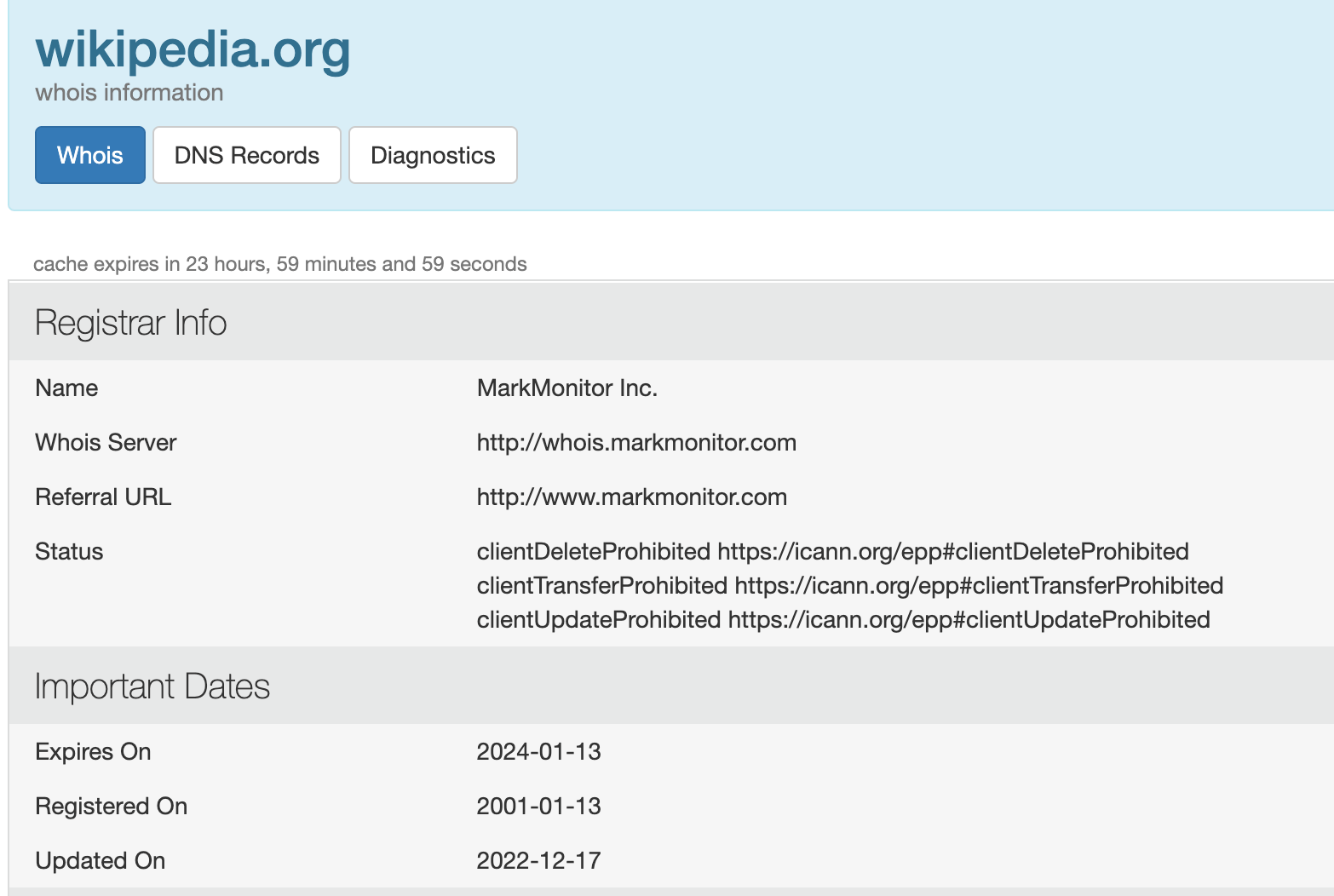
The result looks something like this. The domain’s status is shown in the ‘Domain Status’ line (or lines):
Statuses of general extensions
| Status | Status | Meaning |
|---|---|---|
ok / active |
Active | The domain is active and has no restrictions |
addPeriod |
Active | The domain has recently been registered |
clientTransferProhibited |
Active | The domain is locked to prevent unauthorised transfer |
pendingTransfer |
Active | Transfer is in progress |
autoRenewPeriod |
Active | The domain has expired and the registrar has automatically renewed it, but it can still be cancelled |
clientHold |
Inactive | The registrar has suspended the account (for example, due to non-payment or an audit) |
serverHold |
Inactive | The registry has suspended |
redemptionPeriod |
Inactive | The domain has expired and can still be restored, but only by paying a redemption fee |
pendingDelete |
Inactive | The domain will be deleted within a few days, after which anyone can register it |
Statuses ending in “Prohibited” (e.g. clientUpdateProhibited, clientDeleteProhibited) are security settings, not errors: they indicate that a particular action is prohibited. The article on domain expiry and the redemption period provides detailed information about post-expiry statuses.
Statuses of .hu domains
The .hu domain registry uses its own status codes:
- Status: the request has been received and is currently being checked and assessed.
- Provisionally registered: the domain is already available for use, but the 8-day public notice period is still ongoing.
- Registered: the domain has been permanently registered and is active.
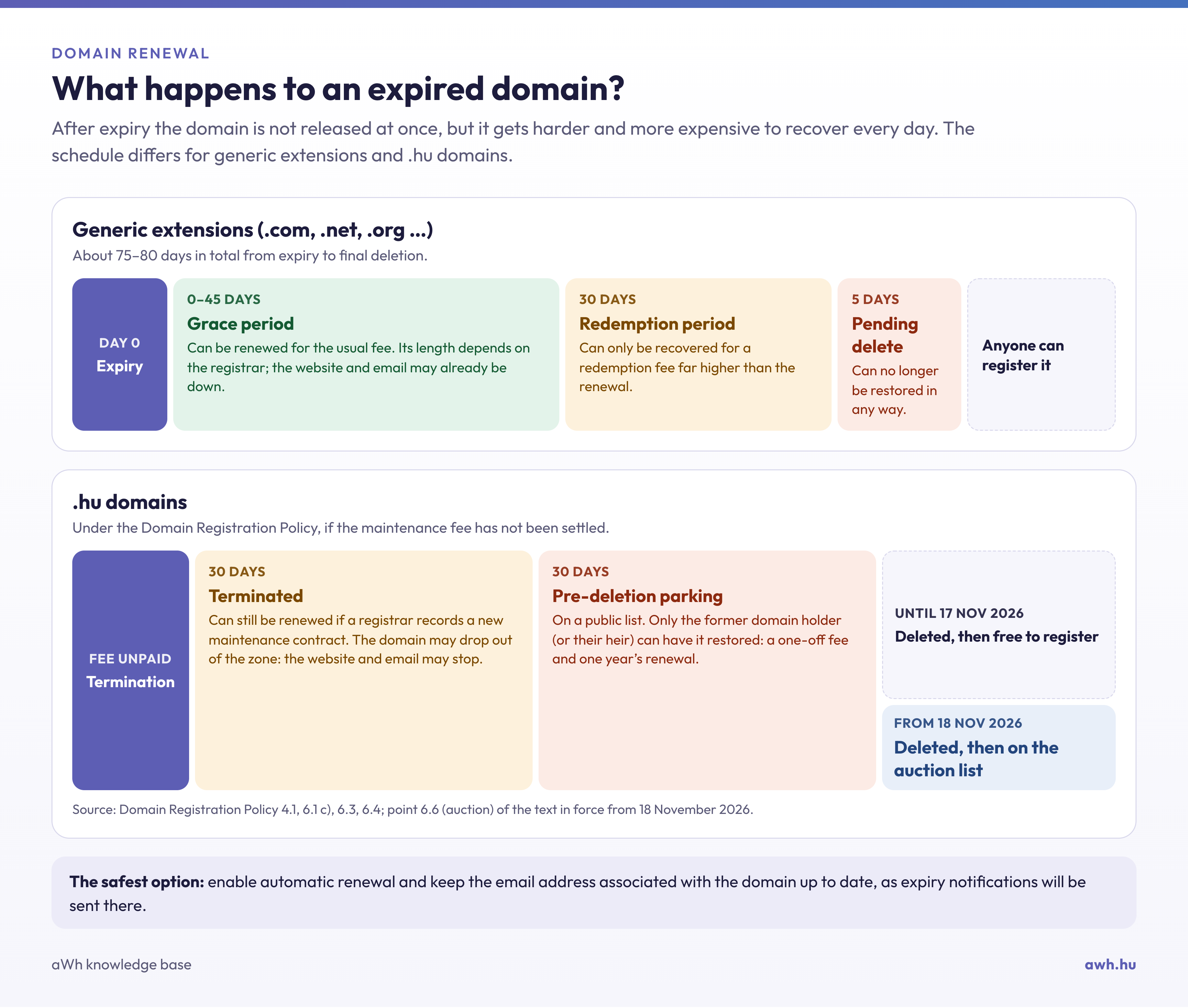
- Terminated: the registrar has terminated the service (e.g. due to non-payment); it can still be reinstated within 30 days.
- Parking prior to deletion: a 30-day grace period following cancellation, during which only the previous domain holder may reclaim it.
Personal data in WHOIS
Since the introduction of the GDPR, the names and contact details of private individuals are no longer displayed in WHOIS queries; for .hu domains, this happens automatically. There is a separate article on hidden data and the domain privacy (WHOIS privacy) service.