 English
 Magyar


If you wish to transfer an existing domain name from another provider to aWh (or elsewhere), the process consists of a few clearly defined steps. The transfer changes the registrar: the domain holder and the DNS settings remain the same, whilst the expiry date is extended by one year for most extensions, including .hu domains.
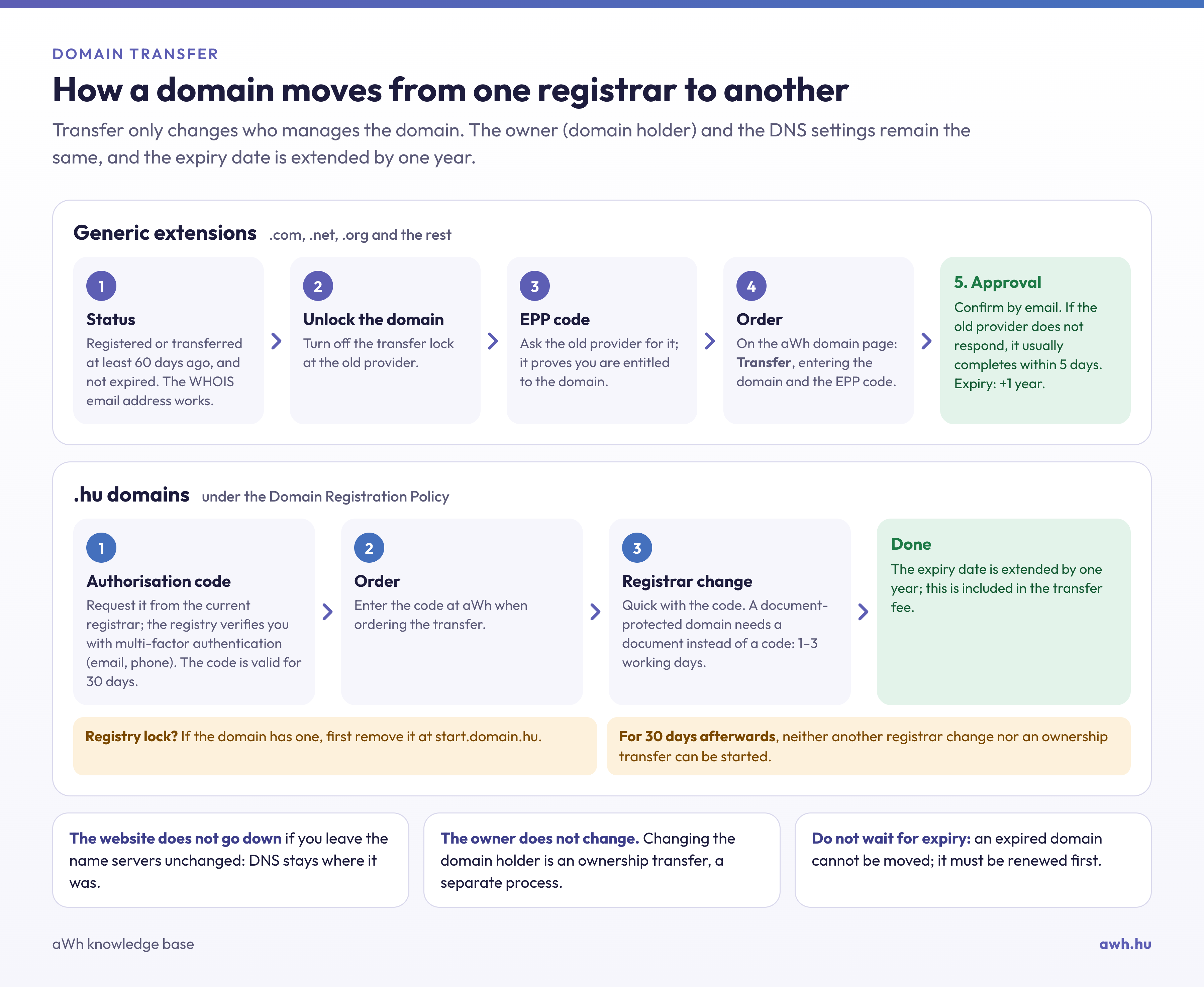
General domain extensions (.com, .net, .org and others)
1. Check the status of your domain
The registrar may refuse the transfer if the domain was registered or transferred less than 60 days ago, and the transfer cannot be initiated if the domain has already expired and is in the redemption period. If the domain is due to expire within a few days, please initiate the renewal with your current provider first. Also check in WHOIS that the email address provided for the domain is valid, as confirmation emails will be sent there.
2. Unlock the account
Most domains are protected by a transfer lock by default. You can disable this in your current provider’s control panel.
3. Request the EPP code
Ask your current provider for the EPP code (Auth code) associated with the domain, which confirms that you are authorised to perform the transfer.
4. Start the transfer process
On the aWh domain page, select the ‘Transfer’ option, enter your domain name and EPP code, then complete the order.
5. Confirm
During the process, you will need to confirm the transfer via email. Your previous provider may also send you an email asking you to approve or reject the transfer; if they do not respond, the transfer will typically be completed automatically within 5 days. For these domain extensions, the transfer renews the domain’s expiry date by one year.
.hu domains
Transferring .hu domains is now simpler and quicker:
- Request the domain authorisation code from your current registrar. The registry will verify that you are the domain holder via email and telephone (with a verification code); the code will then be valid for 30 days.
- Enter the code when placing a transfer order with aWh.
- Once the code has been entered, the transfer will take place immediately.
For domains registered using the old application form and protected by a legal document, a declaration set out in a private document with full probative value is required instead of a code; in such cases, the transfer usually takes 1–3 working days.
According to the Domain Registration Policy, changing registrars extends the expiry date of a .hu domain by one year; this is included in the transfer fee. If the domain is protected by a registry lock, this must first be lifted on the start.domain.hu website. For 30 days following the transfer, neither a further change of registrar nor the transfer of the domain may be initiated.
Important information
- Your website and email will continue to function as normal if you do not change your name servers: your DNS settings will remain at their original location even after the transfer.
- If you are also transferring your DNS to aWh, please read the article on the difference between an A record and a name server change.
- Changing the domain holder (for example, when a company is sold) is not a registrar transfer but an ownership transfer; our blog post on domain ownership transfer explains the process.