 English
 Magyar


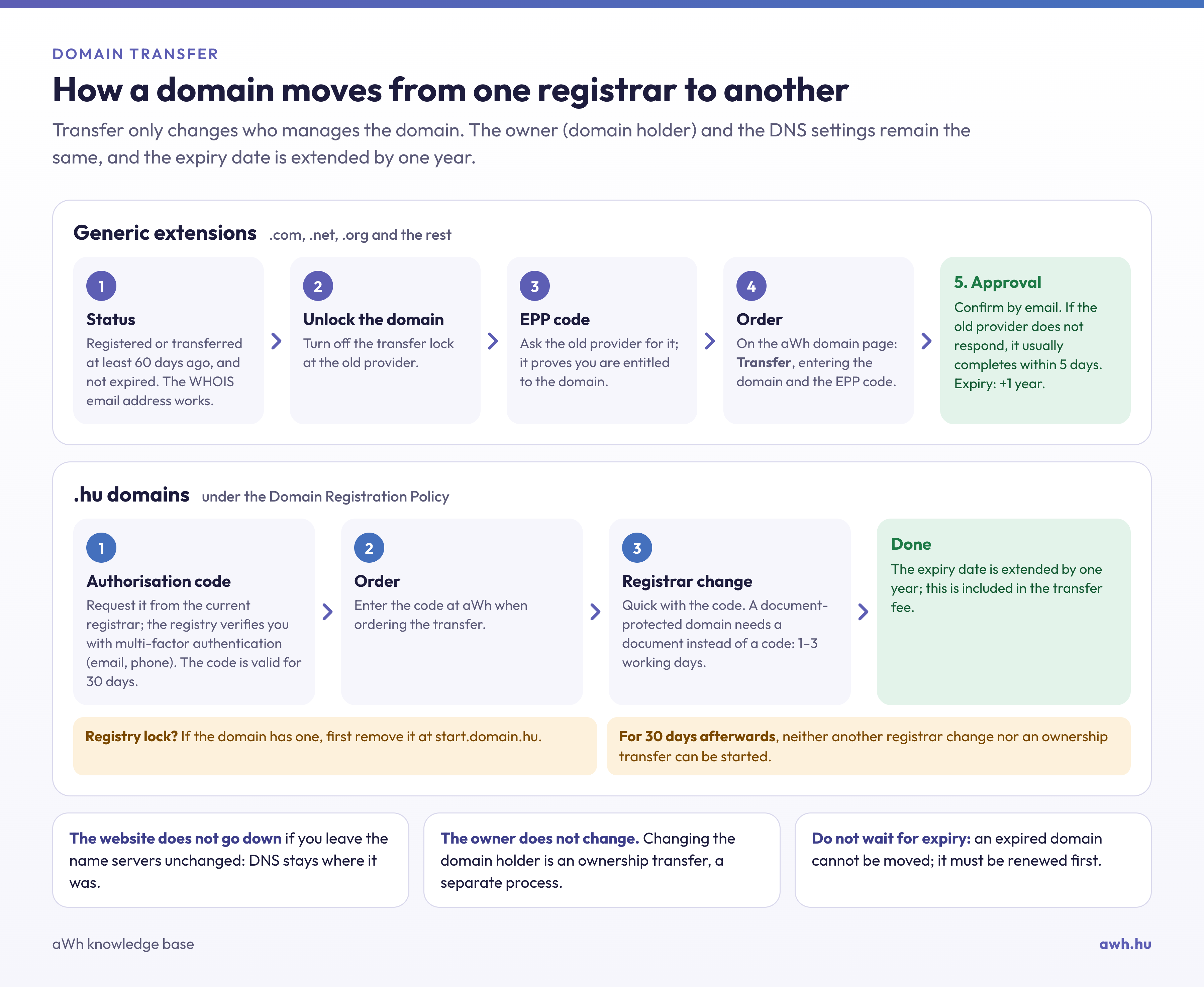
The EPP code (also known as an Auth code, authorisation code or transfer code) is a secret, unique string of characters that verifies that the ownership of the domain is being transferred legitimately. It is most commonly required for domain transfers: this code must be entered alongside the domain name when registering with a new registrar, and if the code is incorrect, the transfer will not proceed.
The code is the domain’s key: anyone who knows it can transfer the domain to another provider. Therefore, never send it to anyone you do not know, and do not publish it in a public place.
.com, .net, .org and other generic extensions
For most common domain extensions (.com, .net, .org, .info, .biz, .shop and others), the code is issued by the current registrar, typically via the domain management interface or upon request. Before transferring the domain, the transfer lock must also be removed; otherwise, the code will be invalid even if it is correct.
For these domain extensions, the registrar may refuse a transfer within 60 days of registration or a previous transfer; it is therefore advisable to wait in such cases.
.hu domains: the domain authorisation code
For .hu domains, the code is generated by the registry (domain.hu) and is known as the domain authorisation code. The process is as follows:
- You can request the code from the registrar currently managing the domain.
- The registry then carries out two-factor authentication: it verifies that you are the domain holder by sending messages to the email address and telephone number provided for the domain.
- Once you have logged in, the code is valid for 30 days and can be used once.
The code consists of 16 characters (for example, 7EA5-CO3A-0AFZ-STGS); it is not case-sensitive, and the hyphens may be omitted. The same code is used for changing registrars and transferring domains (changing the domain holder), so please handle it with particular care. If you have requested the code in error, or if it has fallen into the wrong hands, the registrar may revoke it at your request, following verification of your identity.
If you are unable to retrieve the code via your registrar, you can also initiate the process on the registry’s website at start.domain.hu, although the verification process there may take longer. If a registry lock is active on the domain, the code cannot be retrieved; the lock must be lifted first.
No code can be requested for .hu domains registered using the old application form and protected by a deed: in such cases, a declaration set out in a private deed with full probative force is required for the transfer, and the process usually takes 1–3 working days.
Other extensions
Certain country code extensions use their own procedures: for .co.uk domains, for example, instead of a code, the current registrar transfers the domain to the new registrar’s identifier (IPS tag). If you are unsure which procedure applies to your domain, please contact us and we will let you know.