 English
 Magyar


Redis is an in-memory key-value database. On websites, it is most commonly used as a cache: it stores WordPress’s object cache, session data or temporary data from an online shop, so the application does not need to access the database for every request.
Valkey is an open-source (BSD-licensed) version launched following Redis’s licence change in 2024, maintained by the Linux Foundation. It was forked from Redis 7.2 and uses the same protocol and commands, meaning programs and PHP extensions written for Redis will work with it without any changes. Red Hat therefore now only supplies Valkey in AlmaLinux 10.
We tested these steps in October 2026 on AlmaLinux 10.2 and 9.8 systems. Run the commands as the root user or using sudo.
Which one from where?
| System | In the system’s repository | In the Remi repository |
|---|---|---|
| AlmaLinux 10 | Valkey 8.0 (no Redis) | Redis 7.2 … 8.10, Valkey 8.1 … 9.2 |
| AlmaLinux 9 | Redis 6.2 (basic), Redis 7.2 (redis:7 module), Valkey 8.0 |
Redis 6.0 … 8.10, Valkey 8.1 … 9.2 |
Unless you have specific requirements, use the version provided by the system repository: Valkey on AlmaLinux 10, or Redis 7.2 on Valkey AlmaLinux 9. These are updated via AlmaLinux updates. If an application specifically requires Redis 8 (for example, due to the Redis Query Engine or the JSON module), install it from the Remi repository.
A) Valkey from the system repository
sudo dnf install valkey
sudo systemctl enable --now valkey
valkey-cli ping
The answer is PONG. In the test, valkey-8.0.11 was installed on AlmaLinux 10. Valkey also refers to a version number compatible with Redis:
valkey-cli INFO server | grep -E 'redis_version|valkey_version'
redis_version:7.2.4
valkey_version:8.0.11
The program names begin with valkey- (valkey-server, valkey-cli, valkey-benchmark), the service name is valkey, the configuration file is /etc/valkey/valkey.conf, the data directory is /var/lib/valkey, and the log file is /var/log/valkey/valkey.log. Only root can read the configuration file, so sudo is required to edit or view it. The redis-cli and redis-server command names do not exist on AlmaLinux 10, and at the time of testing there was no compatibility package available for them either; please replace them with valkey-cli-re in the scripts.
On AlmaLinux 9, Redis 7.2 can be installed from the module (redis-7.2.16 was installed during the test):
sudo dnf module enable redis:7
sudo dnf install redis
sudo systemctl enable --now redis
Without specifying a module, running dnf install redis on AlmaLinux 9 would install the old Redis version 6.2.
B) Redis 8 from the Remi repository
After setting up the Remi repository (see: Installing the Remi repository on AlmaLinux), select the version, for example Redis 8.4:
sudo dnf module enable redis:remi-8.4
sudo dnf install redis
sudo systemctl enable --now redis
redis-cli ping
redis-8.4.8 was installed for the test, along with the recommended dependencies: the redis-bloom, redis-json and redis-timeseries modules. The configuration file is located at /etc/redis/redis.conf, the data directory at /var/lib/redis, and the log file at /var/log/redis/redis.log.
If Valkey is also installed on the machine, you must first disable and remove it (sudo systemctl disable --now valkey, sudo dnf remove valkey), as both use port 6379.
Redis 8 is available under three different licences, including the AGPLv3. If you are using it on your own server as a cache for your own application, this does not impose any obligations; however, if you intend to provide Redis as a service to others, please read the licence terms.
Default settings
The following applies to both Valkey and Redis; the files are /etc/valkey/valkey.conf and /etc/redis/redis.conf respectively. For the test, both packages were installed with these default settings:
bind 127.0.0.1 -::1
protected-mode yes
port 6379
In other words, the server only accepts connections from within the machine itself. If Redist is the only service using its own website on the same server, do not change this: never open port 6379 to the internet. If another server were to use it, do so via a private network or an SSH tunnel, and be sure to set a password.
It also listens on Unix sockets: /run/valkey/valkey.sock and /run/redis/redis.sock.
Password
Find the line # requirepass foobared in the configuration file and change it to:
requirepass Hosszu-Egyedi-Jelszo
After a restart, every command returns an error without a password:
NOAUTH Authentication required.
redis-cli (valkey-cli at Valkey) prompts for the password in a hidden manner using the --askpass switch, or retrieves it from the REDISCLI_AUTH environment variable. The -a jelszo switch also works, but the password is then recorded in the command history and the process list.
Memory limit
Set an upper limit for the cache and specify what Redis should discard when it is full:
maxmemory 256mb
maxmemory-policy allkeys-lru
allkeys-lru deletes the oldest keys, which is suitable for caching. Other options include: allkeys-lfu (deletes the least frequently used keys) and volatile-lru (deletes only keys with an expiry time). With the default noeviction setting, Redis returns an error on write operations when memory is full. If you are storing data in Redis that must not be lost (such as tasks in a queue), do not use the allkeys- rule. Set the limit relative to the server’s total memory: ensure there is enough left for both PHP and the database (see: Out of memory: OOM killer and swap file).
After amendment:
sudo systemctl restart valkey # vagy: redis
The overcommit warning
Upon first launch, the following warning appeared in the log:
WARNING Memory overcommit must be enabled! Without it, a background save or replication may fail under low memory condition.
The background backup (writing memory contents to disk) is linked to this kernel setting. Enable it permanently:
echo 'vm.overcommit_memory = 1' | sudo tee /etc/sysctl.d/90-redis.conf
sudo sysctl -p /etc/sysctl.d/90-redis.conf
After restarting, the warning disappeared.
Try it out from the command line
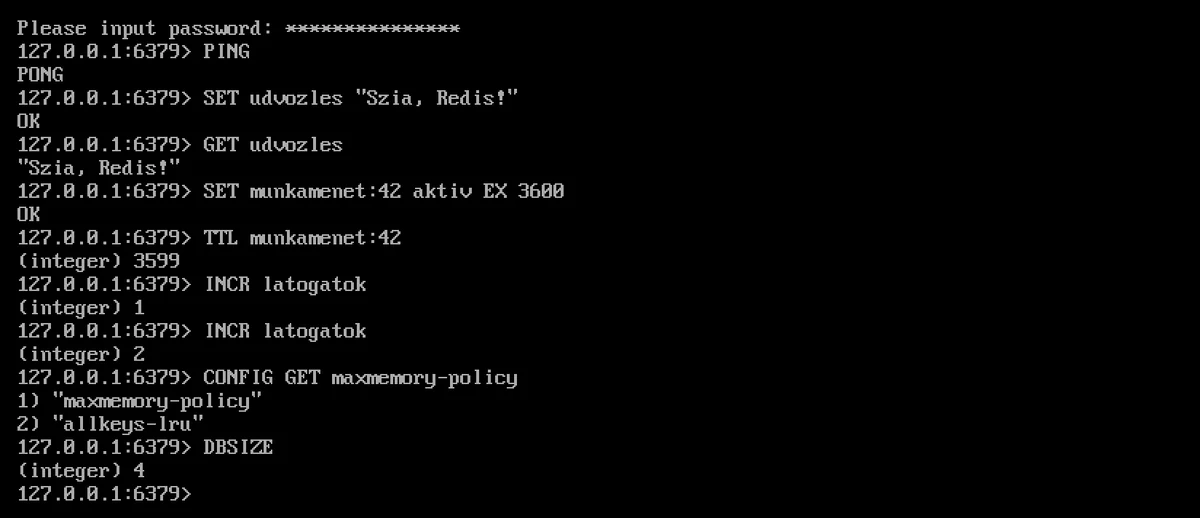
SET udvozles "Szia, Redis!"
GET udvozles
SET munkamenet:42 aktiv EX 3600
TTL munkamenet:42
INCR latogatok
CONFIG GET maxmemory-policy
DBSIZE
EX 3600 generates a key that expires after one hour; the TTL shows the remaining seconds. Redis is primarily a cache: its data is stored in memory and is only written to disk occasionally, so you should not store important data here alone.
Usage in PHP
The PHP Redis extension works with both Valkey and Redis:
sudo dnf install php-pecl-redis6
sudo systemctl restart php-fpm
On AlmaLinux 10, PHP 8.3 is sourced from the AppStream repository, whilst PHP for Remi is sourced from the Remi repository. Test:
php -r '$r = new Redis(); $r->connect("127.0.0.1", 6379); $r->auth("Hosszu-Egyedi-Jelszo"); $r->set("teszt", "mukodik"); echo $r->get("teszt"), PHP_EOL;'
In the test, the response was mukodik. In WordPress, Redist is integrated via an object cache plugin; to configure it, you’ll need the server address 127.0.0.1, port 6379 and the password mentioned above. Our blog post on database optimisation explains how much the cache helps the database.
Upgrading, removal
You can switch between Remi modules in the same way as with PHP (sudo dnf module switch-to redis:remi-8.6). Do not switch back to an older major version whilst using production data: older versions of Redis may not always be able to read the backup file (/var/lib/redis/dump.rdb) created by a newer version, and will crash on start-up. In this case, revert to the newer version, or if it was only a cache, save and delete the file.
Removal (at Valkey: valkey):
sudo systemctl disable --now redis
sudo dnf remove redis redis-bloom redis-json redis-timeseries
sudo dnf module reset redis
The configuration files (/etc/redis/) and data (/var/lib/redis/) can remain on the machine for the time being; if they are no longer required, delete them after performing a backup. If you added the vm.overcommit_memory setting solely for Redis, you may also delete the /etc/sysctl.d/90-redis.conf file.
How much memory do I need?
Redis’s memory requirements depend on the data stored. Current memory usage is shown by the redis-cli INFO memory command (the used_memory_human line); after a few days of operation, adjust the maxmemory value accordingly. If the server does not have enough memory to accommodate the web server, the database and Redis, you can upgrade to a larger KVM VPS plan or run Redis on a separate machine.