 English
 Magyar

Have you seen a pop-up warning message on your computer screen? Perhaps it was an unsolicited email warning you about a virus or a problem with your computer? Or maybe a phone call claiming to be from Apple or Microsoft? Any of these could have been a technical support scam. But how can you be sure? What should you do if you’re targeted by a technical support scammer?
According to a report by the Federal Trade Commission, adults aged 65 and over are five times more likely to fall victim to tech support scams1, but anyone can be a potential target, regardless of age.
How to spot a tech support scam
Technical support scammers use a variety of tactics to deceive their victims. They usually try to appear legitimate and claim to be from a genuine company, such as Microsoft or Apple. They portray the ‘problem’ as urgent so that you act out of panic or fear, rather than thinking things through. The ultimate aim of technical support scammers is to gain access to your computer, your billing details or direct payments. Genuine technical support never works like this.
If you’re aware of the tactics used by tech support scammers, you can avoid panicking when they try to convince you that there’s an urgent security issue. Then, and only then, will you be smart enough to avoid falling victim to the scam.
Phone calls
A tech support scammer calling you on the phone will pretend to be a computer technician from a well-known company, such as an antivirus provider, Microsoft or Apple. They will inform you that they have found a problem with your computer and ask you to grant them remote access to your computer so that they can fix the problem. Once they have gained access, they will pretend to run a diagnostic test.
At this point, the call can end in one of three ways. After running the so-called ‘diagnostic test’, they may end the call without you realising that they have actually installed malware on your computer, which will allow them to access your computer unhindered in the future. They may lock you out of your computer entirely and demand a ransom to restore access. Or they may display fake security threats and demand payment to fix a problem that never existed in the first place.
If you receive an unexpected phone call and someone claims there is a problem with your computer, hang up. Do not give them any information, and under no circumstances grant them remote access to your computer. No unsolicited phone call from a computer repair specialist is legitimate. They will only contact you by phone if you have requested a callback.
Pop-up alerts
A technical support scam may surprise you with a pop-up window appearing on your computer screen. It may appear as an error message originating from your operating system or antivirus software. It may appear within your browser as a webpage or pop-up window, and may feature the logos of reputable companies, such as antivirus firms, Windows or Apple.
The message that appears warns you of a security issue on your computer and instructs you to call a telephone number, run a scan or download a program onto your computer to remove the security threat.
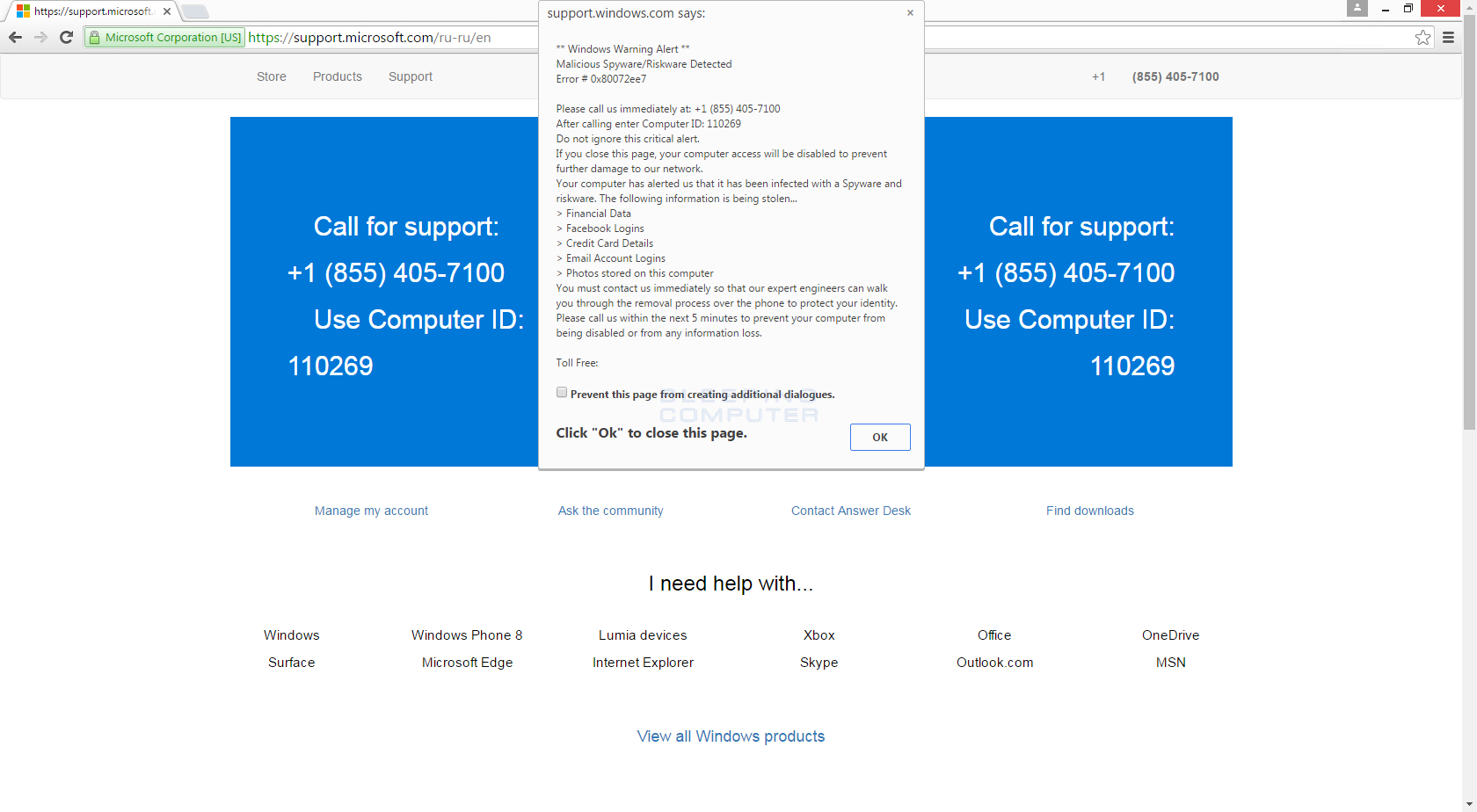
If you download the program or call the telephone number provided, you will either find that your computer has been infected with malware, or you will be completely locked out of your computer, and you will receive a payment demand to resolve a non-existent problem or to regain access to your computer.
The bottom line: If you see a pop-up warning, do not call the telephone number and do not download the program. Genuine security warnings never ask you to call a telephone number or download a program to resolve the issue.
Search engine results pages (SERPs)
Technical support scammers may use a marketing technique known as search engine optimisation (SEO) to ensure their website appears on the first page of search results, or they may pay for online adverts. It is a common misconception that websites appearing in search results are legitimate, but this is not always the case.
Much like technical support scams that originate from phone calls and pop-up alerts, technical support scammers appearing in search results aim either to gain access to your computer, install malicious software on your device, or make money by ‘fixing’ a non-existent problem on your computer.
How to deal with computer problems
If you think there is a problem with your computer, start by checking with your antivirus provider. If you use Guardio, run a scan or contact the support team and describe the problem; we will then help you determine what ‘next steps’ you need to take.
Always use a reputable company. If you need in-depth assistance, try contacting your computer manufacturer for a list of reputable repair technicians, or visit the service centre of your local computer repair or retail company.
If you’re not already using browser protection, activate it now. Browser protection stops threats before they reach your computer and have a chance to cause (sometimes irreparable) damage.
If you’ve fallen victim to a tech support scam
If you have paid a technical support scammer by credit or debit card, contact your card issuer immediately. Explain what has happened, and in many cases they will be able to reverse the charge. They may also issue you with a new card to prevent you from seeing any fraudulent charges on your account. If you paid the scammer using a gift card, contact the gift card issuer to have the card deactivated and your money refunded.
If you have granted remote access to your computer to a technical support scammer, contact a reputable computer repair specialist. They will be able to identify how the technical support scammer gained access to your computer and prevent any future access.
Finally, if a fraudster posing as technical support has got hold of your login details, change your password immediately. Update your password for any other accounts where you have used the same or a similar password.
Key points to note
- A legitimate technical support provider will not contact you by telephone, email or text message to alert you to a problem.
- A genuine security alert will not instruct you to download a program or call a telephone number to resolve the issue.
- Never share your billing details, National Insurance number or any personal details with someone who has contacted you for the first time.
- If you need help resolving a problem, use a reliable computer repair specialist. Don’t rely on an internet search.
- Legitimate companies never ask for payment in the form of gift vouchers, bank transfers or Bitcoin.
- Use browser protection to prevent scams and other threats from infecting your computer.
-
https://www.ftc.gov/news-events/data-visualizations/data-spotlight/2019/03/older-adults-hardest-hit-tech-support-scams#end1 ↩