 English
 Magyar


The Hypertext Transfer Protocol (HTTP) is a communication protocol used for communication between web servers (e.g. a website) and clients (e.g. your browser) on the internet.
HTTP operates on the client-server model: the client sends a request to the server, and the server sends a specific response back to the client in response to that request. This request can be anything from retrieving a web page to creating a user account using a specified username and password. Individual requests are independent of one another: a single request yields a single response.
As well as HTTP, we often come across the HTTPS protocol in web addresses. This stands for Hypertext Transfer Protocol Secure, and indicates that the communication is protected by an extra layer of security, meaning that malicious actors cannot easily intercept it. In our previous post on SSL, we explained exactly what this means and how it works. It is important to note that everything discussed in this article also applies to HTTPS.
HTTP requests can be used for a number of different purposes, each of which is designated by its own ‘method’. Only a few selected methods are used frequently, and it is important to be familiar with them. The most common method is the one that brought you to this blog: the GET method. As its name suggests, this method is used to retrieve information from the server. Your browser sent one such request when you clicked on a link to read this article, in order to retrieve the HTML for this web page.
For example, if you want to send information to a web server to log in to an account or fill in a form, you should use the POST method. Two other commonly used methods are PUT and DELETE. PUT is very similar to POST, but is used to update existing records rather than create new ones, whilst DELETE, as you might have guessed, is used to request the deletion of certain data.
But how exactly are these methods used when sending a request?
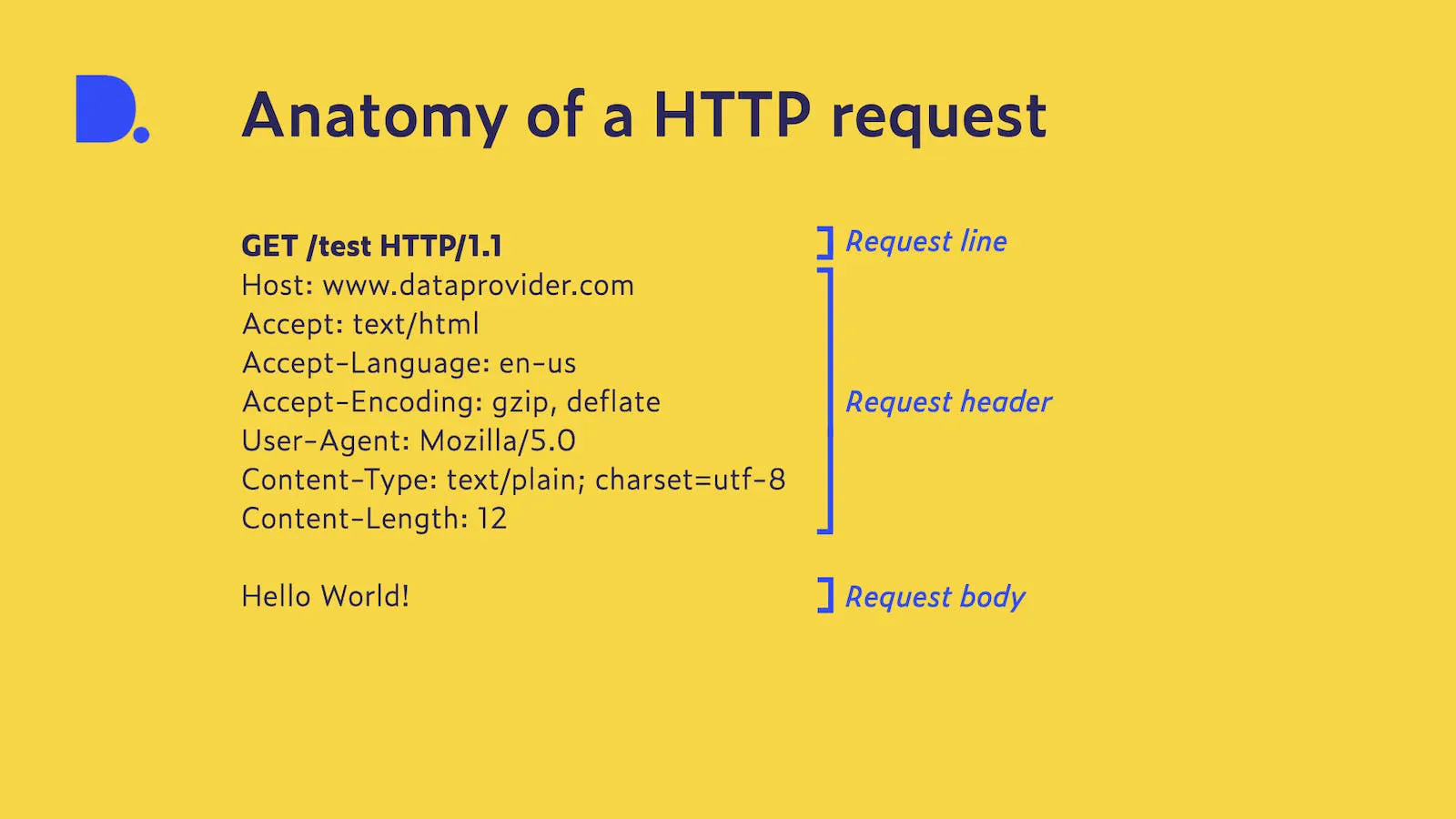
The diagram above shows a visual representation of an HTTP request. This may seem daunting at first, but let’s break it down and look at each part. This is a request to a server, which processes the text we provide and, in this case, returns an HTML page to us with our text in a heading. The first part of the request, which we send to this server, is the request line, consisting of three components: the method, the resource, and the protocol version. This line tells the server what operation we wish to perform, at which target this operation should be carried out, and – to avoid any misunderstanding – which specific protocol we wish to use for communication. In our case, this is a GET request, as we wish to retrieve an HTML page. We send this request to the (fictitious) /test endpoint using the HTTP version 1.1 protocol.
Next up are the headers. The headers in a request can be regarded as metadata that inform the server about the requested data and the client sending the request. These headers can be further divided into categories, but we’ll ignore those for now. In our request, we need to include several headers to tell the server what our request is – via the Content headers – and what we expect in the response – via the Accept headers. The Host header ensures that the request is routed to the correct server.
The User-Agent header tells the server what device we are using and which browser we are using. This header looks different for each type of device, but it usually begins with ‘Mozilla/5.0’ to indicate that the browser is compatible with Mozilla. This is just a small selection of the possible headers that can be sent along with a request. For a complete overview, see Mozilla’s documentation on HTTP headers.
Finally, separated from the headers by a single blank line, comes the body of the request. This is optional, as not every request needs to send content to the server, but in our case we would like to send some text, which will appear in the form of a heading. This is a very simple example; the body of the request can be much more complex than this, potentially involving multiple resources.
Once the request has been processed, the server sends back a response. If the request is successful, the response might look like this:
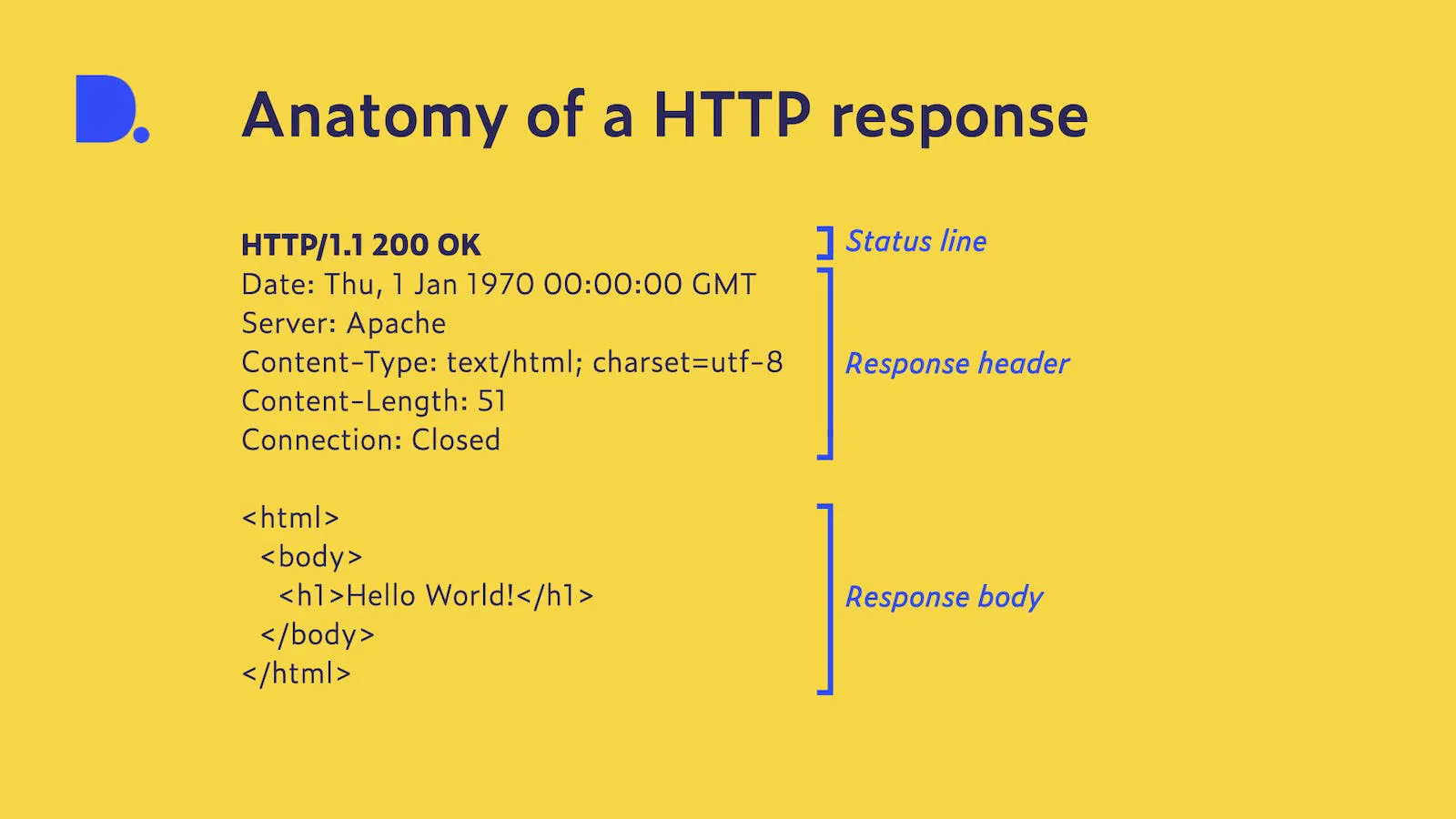
The structure of an HTTP response is very similar to that of a request. It begins with a status line, which uses a status code and an additional status message to inform the client which HTTP version is being used and how the request was handled. These status codes can be categorised into five groups and indicate whether the request was successful or not. As our request was successful, we received a 200 status code with the text ‘OK’, indicating that everything went according to plan. This and other status codes can be found in our own data, in which we store the response codes and headers for every website we have crawled.
The status line is followed by the response headers, which provide information about the server and the content returned. This content is again separated from the headers by a blank line and, in our case, contains the HTML structure of a web page, together with the text sent to the server, in a single line.
Hopefully, you now know a bit more about the complex nature of the internet and what goes on behind the scenes when you visit your favourite recipe blog or update your LinkedIn profile.