 English
 Magyar


When launching your first website, you’ll come across lots of new terms: hosting, domain, DNS, database, SSL and bandwidth. These may seem complicated at first, but the basics can be explained in just a few sentences, and once you understand them, you’ll be much more confident when choosing a provider and a plan.
This guide is aimed at beginners. We explain in simple terms what web hosting is and how it works, what types there are, what the hosting plans mean, how hosting relates to domains, email and SSL certificates, and we take you through the process of launching your first website step by step.
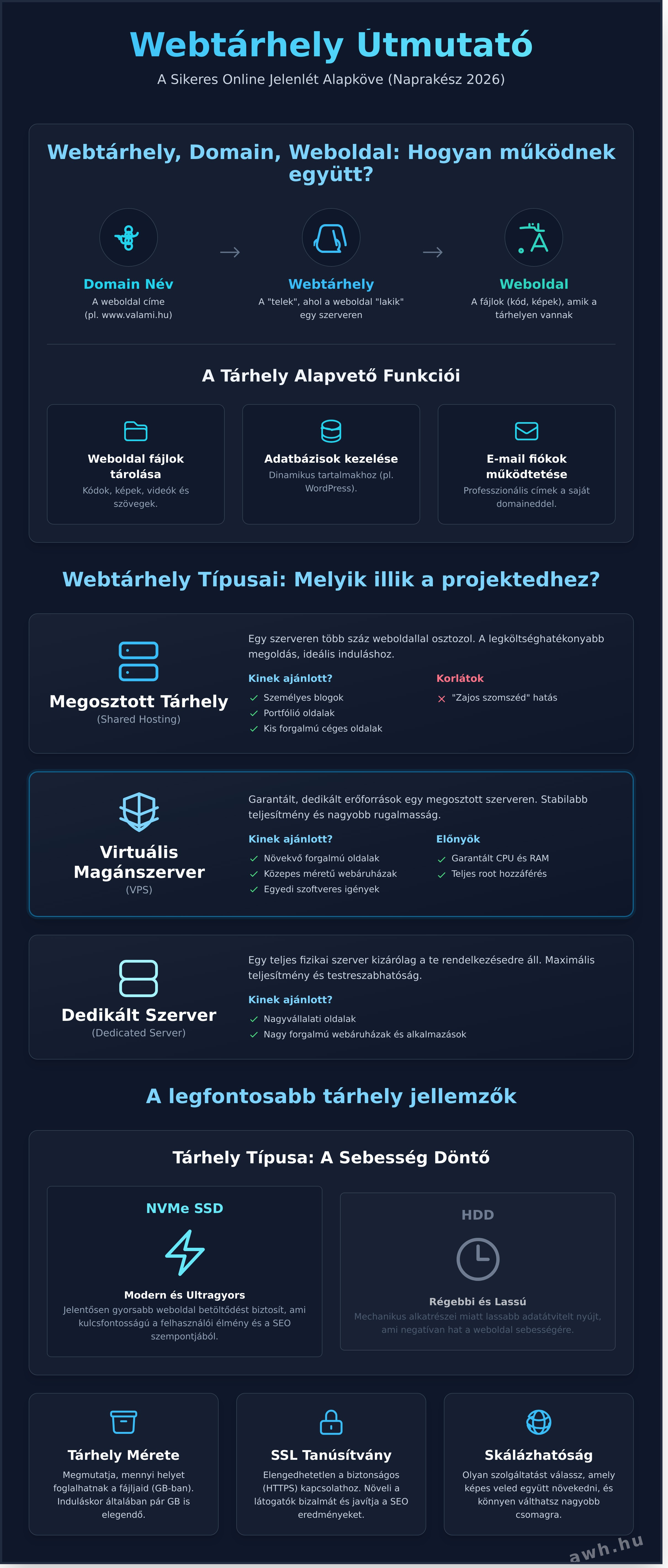
What is web hosting?
Imagine your website as a house. Web hosting is the plot of land on which the house stands: a rented space on a constantly running, high-performance computer – a server – where all the files (text, images, code) and the database that make up your website are stored. The domain name (for example, cegnev.hu) is the address of the house, which visitors use to find it.
Why isn’t it enough to simply store your website’s files on your own computer? Because your website needs to be accessible 24 hours a day, with a fast internet connection, without power cuts or reboots, and someone needs to take care of server security and updates. The hosting provider does this for you, using servers housed in a data centre with redundant power supplies and network connections.
How does a website reach its visitors?
- The visitor types the domain name into their browser.
- The browser uses the DNS (Domain Name System) to find out which server’s IP address this name corresponds to. The DNS is the internet’s phone book.
- The browser connects to the server and requests the page.
- The server builds the page (in the case of a WordPress site, it does this by running PHP code and reading from the database), then sends it back.
- The browser displays the page.
All of this typically takes place within a second. The details are set out in our article on how the website works.
What does a hosting plan include?
- Storage: the space for your website’s files, databases and (if included in your plan) emails.
- Databases: dynamic websites, such as WordPress, store posts, pages, users and settings in a MySQL or MariaDB database.
- Email accounts: email addresses with your own domain, for example
info@cegnev.hu. - Control panel: a graphical interface (such as cPanel) that allows you to manage files, databases, email accounts and domains without any programming knowledge.
- SSL certificate: for an encrypted HTTPS connection.
- Backup: an automatic copy of your data, from which you can restore your site following a fault.
What sort of website needs hosting?
It’s suitable for practically anything that can be accessed via your own domain: a personal blog or portfolio, a company website, an online shop, a forum or an online application. The difference lies in the size and type of hosting required.
Types of web hosting
Shared hosting
Several clients’ websites run on a single server, and they share the resources (processor, memory) between them. The provider operates the server, updates the software and takes care of security; all you need to do is focus on your website. This is the cheapest and most convenient solution, and it is sufficient for the vast majority of websites.
- Who is it recommended for? Blogs, portfolios, company websites and small online shops.
- Advantages: low price, easy to use, no need to manage a server.
- Limitations: every account has an upper limit on CPU and memory usage, and you can only run software supported by the provider (typically PHP and MySQL). Good providers isolate accounts from one another, so an overloaded or hacked neighbouring site won’t affect yours.
- If you outgrow it, you can switch to a larger plan, and later to a VPS plan, and you can migrate your website.
We’ve also written a separate article on how shared hosting works.
aWh’s shared hosting plans: KeyHelp-based web hosting, cPanel hosting and WordPress-optimised hosting.
Static hosting
If your website consists of pre-built HTML, CSS and JavaScript files (for example, created using a static site generator such as Hugo, Jekyll or Astro), you do not need PHP or a database. Static hosting is ideal for this: it is cheap, fast and offers a limited attack surface. You upload the files via SFTP.
VPS (Virtual Private Server)
A physical server is divided, via software, into several isolated virtual servers, each of which is guaranteed a certain number of processor cores, memory and storage. It runs its own operating system, on which you have administrator (root) rights, so you can install anything you like on it. In return, you are responsible for its operation, unless you opt for a managed service.
- Who is it recommended for? Websites with high traffic, online shops, projects requiring a custom software environment (Node.js, Python, Docker), and developers.
We have compared the differences between shared hosting and VPS in detail in our VPS versus web hosting comparison. aWh’s KVM VPS servers are designed for applications running on Linux, whilst the Windows VPS servers are designed for applications running on Windows Server.
Dedicated server
An entire physical server is dedicated solely to your project. It offers maximum performance and flexibility, but is more expensive and requires greater technical expertise. It is the preferred choice for high-traffic systems and specialised requirements. You can read more about aWh’s dedicated servers on the product page.
Cloud-based hosting
The website does not run on a single server here, but on a network of interconnected virtual servers, meaning that resources can be scaled up or down as required, and the site will not go down even if one machine fails. It is suitable for applications with highly fluctuating traffic and large-scale systems; the cost typically depends on usage, so it is more difficult to calculate in advance, and setting it up also requires more specialist knowledge. It is not necessary for an average introductory website or blog.
Specialised hosting plans
- WordPress hosting: Shared hosting optimised for WordPress, with WordPress management tools (one-click installation, updates and staging environment).
- Reseller hosting: if you’d like to provide hosting to your own customers – for example, as a web developer or agency – you can create individual accounts for them using our reseller cPanel hosting.
- Email hosting: for email only, independent of the website.
What do the parameters mean?
Storage
It is measured in gigabytes (GB) and indicates how much space your files, databases and emails can take up. A freshly installed WordPress site takes up a few hundred megabytes, whilst a new blog or company website, including images, typically requires between 1 and 5 GB. You’ll need more space if you’re storing a lot of images and videos, or if your email accounts are also hosted on the same server.
The type of storage also matters: old hard disk drives (HDDs) are slow, SATA SSDs are faster, and the NVMe SSDs commonly used today are much faster still, resulting in faster page loading and database operations. All of aWh’s hosting plans run on NVMe SSDs.
Traffic and bandwidth
These two terms are often confused. Traffic refers to the total amount of data that the server sends to your visitors over the course of a month; if this is capped in a plan and you exceed it, the provider may slow down your connection or charge an additional fee. Bandwidth refers to the connection speed, i.e. how much data can pass through at any one time. aWh’s paid web hosting plans, cPanel plans and WordPress plans all come with unlimited traffic.
Processor and memory
These factors determine how many visitors and how complex a website the hosting service can handle at any one time. On shared hosting, these are limited per account; for a WordPress site, the PHP memory limit is also important, and should be set to 256–512 MB for sites packed with plugins. If the hosting plan’s limit is too low, the site will slow down or display errors.
PHP version
PHP is the programming language used by WordPress and many other websites. Always use a supported version (in autumn 2026, this will be 8.2, 8.3, 8.4 or 8.5), as older versions do not receive security patches and are also slower.
Uptime
It shows, as a percentage, how much of the time the service is available. 99.9% allows for a maximum of approximately 8 hours and 45 minutes of downtime per year. aWh guarantees 99.9% uptime for its hosting services. Our separate article explains in detail what 99.9% uptime means.
User interface
cPanel is the world’s most widely used hosting control panel: you can create email accounts, manage files, set up databases, and install WordPress in just a few clicks using the WP Toolkit. There are other control panels too, such as KeyHelp, which we use on aWh’s web hosting; this is simpler, with fewer features.
Domains, email and SSL: the essentials of hosting
Domain name
A domain is the address of your website, which must be registered separately and undergone annual renewal. You can register it with the same provider as your hosting (which is the simplest option), or with a different provider; in the latter case, you’ll need to configure the domain’s DNS settings to point to your hosting. Here are a few tips to help you choose:
- Keep it short, make sure it’s clear when spoken, and avoid using hyphens,
- reflect your brand or your business,
- For a Hungarian audience, the
.huextension is the best choice, - If you plan to expand abroad in the future, to protect your brand, it’s worth registering the same name with the
.comor.euextensions as well, - If the name you’ve chosen is taken but not in use, you can contact the domain holder and try to reach an agreement with them regarding the transfer; however, this typically costs more than registering a new name.
Our detailed guide explains how to choose a good domain name. Registering a .hu domain with aWh costs €5.44 per year plus VAT.
Email with your own domain
An info@cegnev.hu address is much more credible than a free email address, and if you switch providers later, your address will remain the same. Most hosting plans include email accounts with spam filtering and webmail. If email is business-critical, or if you need a large number of mailboxes, it’s worth opting for a dedicated email hosting service. Don’t forget to set up your SPF, DKIM and DMARC records, otherwise some of your emails may end up in the recipients’ spam folders.
SSL certificate
An SSL certificate encrypts the connection between the visitor’s browser and the server (this is what makes the address start with HTTPS). Without it, browsers display a ‘not secure’ warning, and search engines also rank the page lower. All aWh hosting plans come with a free, automatically renewing Let’s Encrypt certificate; a paid SSL certificate is only required if you wish to have your company’s details verified.
A step-by-step guide to launching your first website
- Decide what sort of website you want. A blog, a personal website or an online shop? WordPress, a static site or a website builder? The type of hosting you need depends on this.
- Choose a domain. Check its availability using the domain search tool and register it in your own name.
- Choose a hosting plan. As a beginner, a smaller shared hosting plan will suffice; you can upgrade to a larger one at any time later on. We’ve compiled the key considerations in our pre-purchase checklist.
- Link your domain to your hosting. If both are with the same provider, this happens automatically; if not, update your domain’s name servers or A record. The change will take effect within a few minutes to a few hours.
- Enable SSL. You can request a Let’s Encrypt certificate via the control panel with a single click; afterwards, configure the site to always open via HTTPS.
- Set up your website. You can install WordPress in a matter of minutes using the control panel’s installer (the steps are described in our WordPress installation guide), or upload a static site via SFTP or the file manager.
- Set up your email accounts and configure them on your phone and computer.
- Check your backup. See if automatic backups are being made, and try out how to restore from them.
- Keep it up to date. Regularly update WordPress, your plugins and your theme, and use a strong password with two-factor authentication.
Free hosting: when is it a good idea, and when isn’t it?
Some free hosting services place adverts on your site, do not allow you to use your own domain, or impose very strict limitations. However, they can be useful for testing, learning or setting up a small personal website. aWh’s Web Free plan can be used with your own domain and includes 1 GB of storage, 100 GB of monthly traffic, one database and one email account; however, it does not include backups, and the PHP memory limit is lower. Our knowledge base article discusses the limitations of the Web Free plan. For business websites, we recommend a paid plan: with backups, greater resources and a money-back guarantee. We have a separate article on the pitfalls of free hosting.
Summary
Web hosting is where your website is based: this is where your files and databases are stored, and from where your site is served to visitors. Most websites only need shared hosting; a VPS is required when a project outgrows the limitations of shared hosting. When making your choice, don’t just look at the amount of storage, but also consider the type of storage, resource limits, backups, SSL, the control panel and support.
aWh’s hosting plans run on NVMe SSDs, come with free SSL, offer 99.9% uptime and include expert support. Paid plans come with a 14-day money-back guarantee, and we’ll migrate your existing website for free.
Take a look at our web hosting plans
Frequently Asked Questions
How much hosting does a new website need?
For a blog, portfolio or small business website, 1–5 GB is usually sufficient; a WordPress installation, complete with plugins and images, will fit comfortably within this. If your email accounts are also hosted on the same server, you’ll need to factor in the space required for your emails as well. Start with a smaller plan; if you outgrow it, you can upgrade to a larger plan.
How much does web hosting cost?
Entry-level shared hosting is available from a few tens of euros a year, whilst larger plans cost a hundred euros or more a year; VPS is charged on a monthly basis. At aWh, web hosting starts from €6.53 a year (excluding VAT) in addition to the free Web Free plan, whilst cPanel hosting starts from €19.58 a year, excluding VAT. Always check the renewal price before making a purchase.
What is the difference between storage and bandwidth?
Storage refers to how much data you can store on the server (in GB). Bandwidth refers to the connection speed, whilst traffic refers to the amount of data the server sends to visitors over the course of a month. Even a website with limited storage can generate high traffic if it attracts a large number of visitors.
Do you need programming skills to manage your hosting?
No. In the control panel (cPanel, KeyHelp), you can create an email account, install WordPress or enable SSL with just a few clicks. Programming knowledge is only required for bespoke development. For VPS, however, system administration skills are necessary.
What is the difference between Linux hosting and Windows hosting?
Linux-based hosting is the most widespread and is ideal for PHP-based systems (WordPress, Joomla, Drupal, e-commerce platforms). A Windows environment is required for ASP.NET applications and MSSQL databases; at aWh, we offer this in the form of Windows VPS. Unless you are specifically building on Microsoft technology, Linux hosting is the right choice.
Can I upgrade to a larger plan later?
Yes. You can upgrade to a larger plan within the same hosting type, and if your project outgrows shared hosting, you can also move to a VPS.
Can I move my website from another provider?
Yes, aWh includes a free migration service with every hosting plan. Order your new hosting plan, open a ticket with your old hosting login details, and we’ll migrate your website, database and emails with minimal downtime.
Why is an SSL certificate important, and is it really free?
SSL encrypts traffic between visitors and the server, and browsers will warn users if the certificate is missing. All aWh hosting plans come with a free, automatically renewing Let’s Encrypt certificate.