 English
 Magyar


dig (Domain Information Groper) is a basic tool for DNS troubleshooting: it queries a DNS server about one of a domain’s records and displays the response in detail. You can use it to check whether the domain points to the correct IP address, whether the MX or TXT records have been set up correctly, and whether a DNS change has already propagated to a particular server.
The examples were run in October 2026 on an AlmaLinux 10.2 system, using version 9.18.33 of dig, on our own awh.hu domain. The outputs reflect the status at the time of testing; you will naturally see different results on your own domain. For quick network troubleshooting (ping, traceroute, curl), the Network Troubleshooting article provides an overview.
Installation
dig is included in the bind-utils package (dnsutils on Ubuntu and Debian). It is not included by default in the AlmaLinux cloud image:
sudo dnf install bind-utils
dig -v
The first query and the output
dig @1.1.1.1 www.awh.hu
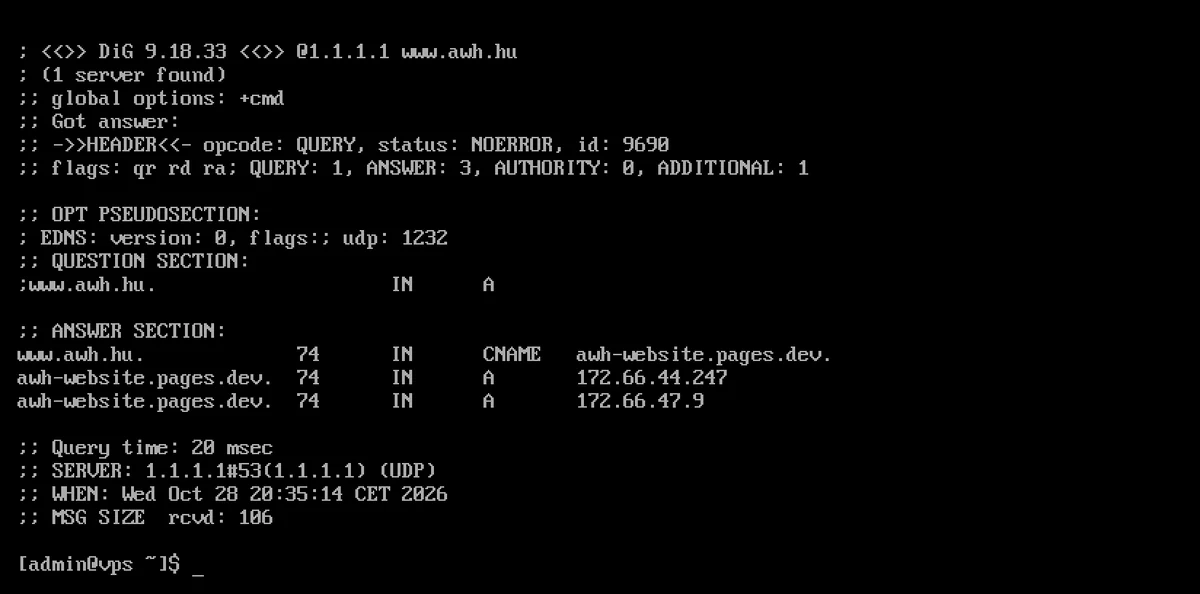
Parts of the output:
- HEADER: the
statusis the result of the response.NOERROR= successful,NXDOMAIN= the name does not exist,SERVFAIL= the server was unable to respond (often due to faulty DNSSEC or an unreachable nameserver). - flags:
qrindicates that this is a response;rdandraindicate that a recursive query was requested and that the server supports this. Ifaais also present in the response, it was provided by the domain’s own (authoritative) nameserver; ifadis present, the response has passed DNSSEC validation. - QUESTION SECTION: what we asked.
- ANSWER SECTION: the response records. The columns are: name, TTL (how many seconds the response can be cached for), class (
IN), type, value. In the example above,www.awh.huis a CNAME pointing to another name, anddighas also listed its A records. - AUTHORITY and ADDITIONAL SECTION: the domain’s name servers and their addresses, if the server has also provided these.
- Query time, SERVER: how long it took, and which DNS server responded.
Record types
The type can be specified after the domain; the default is A:
dig awh.hu A        # IPv4-cím
dig awh.hu AAAA     # IPv6-cím
dig awh.hu MX       # levelezőszerverek
dig awh.hu NS       # névszerverek
dig awh.hu TXT      # szöveges rekordok (SPF, ellenőrző kódok)
dig awh.hu SOA      # a zóna adatai
dig awh.hu CAA      # mely tanúsítványkiadók adhatnak SSL-t
dig awh.hu HTTPS    # kapcsolódási tippek a böngészőknek (HTTP/3, IP-címek)
dig _dmarc.awh.hu TXT
The email authentication records are registered under their own names, not the domain name: the DMARC record is _dmarc.domain.hu, and the DKIM record is the TXT record for <szelektor>._domainkey.domain.hu. The DKIM selector is indicated by the DKIM-Signature header’s s= value in a sent email. The dig domain.hu TXT command therefore only returns the SPF record, not the DMARC or DKIM records.
The article ‘Types of DNS records’ summarises what each record is used for.
Only the answer: +short and +noall +answer
Instead of the full output, the +short option only returns the values:
dig +short awh.hu MX
40 route2.mx.cloudflare.net.
87 route1.mx.cloudflare.net.
55 route3.mx.cloudflare.net.
In an MX record, the first number indicates the priority: the server with the lower number receives the email first. If you want to see the name and the TTL, but not the rest:
dig awh.hu MX +noall +answer
awh.hu.                 286     IN      MX      87 route1.mx.cloudflare.net.
awh.hu.                 286     IN      MX      55 route3.mx.cloudflare.net.
awh.hu.                 286     IN      MX      40 route2.mx.cloudflare.net.
+ttlunits displays the TTL in a readable format (for example, 5h58m46s). Multiple queries can be specified in a single command: dig +noall +answer awh.hu A www.awh.hu CNAME.
If there is a setting you always want to use, write it in the .digrc file in your home directory (for example, +noall +answer); dig reads this file every time it runs. This can lead to some surprises: in a test, even with a .digrc file containing +short, a simple dig awh.hu command only printed the IP addresses. The -r switch ignores the .digrc file; it is worth using in scripts and when debugging (dig -r awh.hu).
Querying a specific DNS server
dig queries the server specified after the @ symbol instead of the machine’s default DNS server:
dig @1.1.1.1 awh.hu +short          # Cloudflare
dig @8.8.8.8 awh.hu +short          # Google
dig @jakub.ns.cloudflare.com awh.hu +norecurse
The last one queries the domain’s own nameserver. The header of the response will then show aa (authoritative answer): this is the source, and all other servers provide a cached copy of it. If, following a DNS change, the authoritative server is already returning the new value but @8.8.8.8 is still returning the old one, the change has not yet propagated through the caches; this will resolve itself once the TTL has expired. For more details: What is DNS propagation?
Different servers may return different, yet equally valid, responses for the same name. In the test, for example, the machine’s own DNS server and 1.1.1.1 returned different IP addresses for the awh.hu record behind Cloudflare, because Cloudflare returns a different address depending on the querier.
Full path: +trace
dig +trace www.awh.hu
+trace does not operate from a cache, but traverses the entire chain: from the root servers (.) through the .hu name servers to the domain’s own name server. The query proceeded as follows during the test:
;; Received 813 bytes from 10.0.2.3#53(10.0.2.3) in 10 ms
;; Received 794 bytes from 199.7.83.42#53(l.root-servers.net) in 20 ms
;; Received 465 bytes from 5.28.0.97#53(a.hu) in 20 ms
;; Received 176 bytes from 172.64.34.116#53(treasure.ns.cloudflare.com) in 20 ms
If the chain is broken at any point or leads to the wrong nameserver, that is where the error lies. After purchasing a domain or changing nameservers, you can check in this way whether the .hu (or other extension) registry is already pointing to the new nameservers.
Reverse search: -x
The name associated with an IP address (PTR record):
dig -x 1.1.1.1 +short
one.one.one.one.
For mail servers, it is important that the PTR record for the outgoing IP address points to a name that resolves back to that same IP address; otherwise, many receiving servers will classify the email as spam. The PTR record is not located in the domain’s DNS zone, but with the owner of the IP address, i.e. the server provider; if you have your own server, you must request that it be set up there.
Name does not exist
dig nincsilyen-domain-12345.hu
The header shows status: NXDOMAIN, and the response section is empty. If you receive an NXDOMAIN response for an existing domain, either the record name is incorrect or the domain is not (or is no longer) registered.
If the name exists but the requested record type is missing (for example, a domain has no AAAA record), the response status: NOERROR but the response body is empty. This is not an error; it simply means that the specific record is missing.
Error statuses: SERVFAIL, REFUSED, timeout
SERVFAIL
The server was unable to respond to the query. A common cause is faulty DNSSEC. With the +cdflag flag (checking disabled), the server responds without performing the check; if a response is received in this case, the DNSSEC is faulty. The test was carried out on a deliberately corrupted test domain:
dig @1.1.1.1 dnssec-failed.org A            # status: SERVFAIL, EDE: 9 (DNSKEY Missing)
dig @1.1.1.1 dnssec-failed.org A +cdflag    # status: NOERROR, flags: qr rd ra cd
The EDE (Extended DNS Error) line also specifies the cause of the error. The +cdflag is for troubleshooting only, not for rectifying the issue.
REFUSED
The server refused to respond. This occurs when an authoritative name server is queried about a domain that it does not serve (in the test, the command dig @jakub.ns.cloudflare.com google.com ended in this way), or when a private DNS server is queried from outside its network.
Timeout
If the server does not respond, the dig command displays the following:
;; communications error to 192.0.2.1#53: timed out
;; no servers could be reached
By default, it makes multiple attempts; with +time=2 +tries=1, it gives up after two seconds and a single attempt.
Exit code in scripts
In scripts, it is important that the dig exit code is independent of the DNS response result: in the test, it was NXDOMAIN even after an 0 response, and 9 when the server was unreachable. Whether the name exists must be determined from the status field.
dig does not check the /etc/hosts file
dig always queries a DNS server directly; it does not read the machine’s /etc/hosts file. In the test, the name proba.awh.hu, which had been added to /etc/hosts, was found by the command getent hosts proba.awh.hu, whilst dig +short proba.awh.hu returned an empty response. If a program resolves the name differently to dig, check the /etc/hosts file as well (and the output of getent hosts, which follows the system’s full name resolution).
ANY query
The dig awh.hu ANY query used to return all records. Today, many name servers deliberately do not provide a meaningful response to this query (RFC 8482). In the test, the authoritative Cloudflare name server for awh.hu returned the following:
awh.hu. 3600 IN HINFO "RFC8482" ""
The machine’s own caching DNS server returned several records for the same query, but not necessarily all of them. If you wish to see all the records for a domain, query them by record type or view them in the DNS management interface.
DNSSEC
dig @1.1.1.1 +dnssec awh.hu
dig awh.hu DS +short
+dnssec, along with the response, also requests the signature (RRSIG record). If the queried server verifies the signatures and everything is in order, the ad indicator appears in the header:
;; flags: qr rd ra ad; QUERY: 1, ANSWER: 3, AUTHORITY: 0, ADDITIONAL: 1
A DS record in the parent zone (in this case, the ..hu zone) indicates that the domain is signed. If the DS record is present but the signatures are invalid, the validating servers will return a SERVFAIL. You can read about DNSSEC in the articles ‘What is DNSSEC?’ and ‘Can DNSSEC cause problems?’.
Other useful links
| Switch | What does it do? |
|---|---|
+tcp |
It queries via TCP instead of UDP (if the firewall blocks UDP) |
-p 5353 |
Forward the question to another person |
-4, -6 |
communicates only via IPv4 or only via IPv6 |
+norecurse |
does not require recursion; in response to a query from an authoritative server |
+time=2 +tries=1 |
shorter waiting times, one attempt |
-r |
It does not read the ~/.digrc file |
-f fajl.txt |
Runs one query per line from a file |
Please only attempt dig @szerver domain.hu AXFR requests on your own zone, which you manage yourself: on third-party servers, this may be regarded as an unauthorised attempt, and the configured servers will reject it anyway.
Checking DNS changes
If the domain uses the web hosting provider’s name servers, you can edit the records in the KeyHelp DNS editor: Editing DNS records on the web hosting platform. After making changes, running dig +short NS domain.hu will show the domain’s name servers, whilst dig @<névszerver> domain.hu will show what the name server is currently returning; this should immediately display the new value. On other DNS servers, the old value may still appear until the old TTL expires. You can search for a new domain on the domain registration page, and our blog post also provides detailed information about the records.