 English
 Magyar


The Linux kernel is the core of the Linux operating system. This program is the first to start after the boot loader and runs continuously until the machine is shut down. It manages the hardware resources (processor, memory, hard drives, network adaptors and other devices) and handles system calls from programs, for example when a program opens a file, requests memory or establishes a network connection.
The kernel is the lowest level of the operating system, which communicates directly with the hardware. User programs, the command line and the graphical interface do not access the hardware directly, but request access via the kernel; this prevents a faulty program from corrupting the memory of other processes.
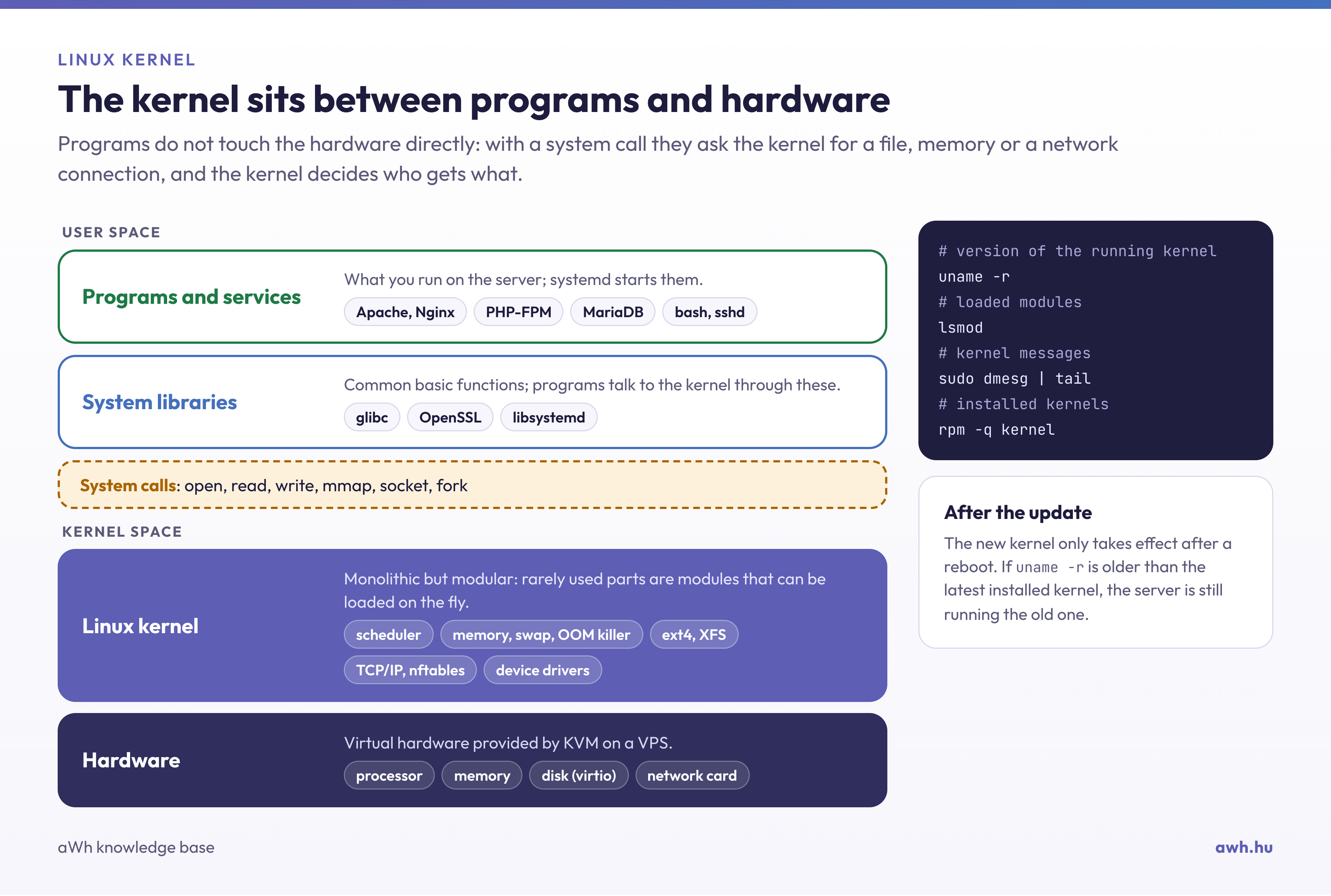
The main functions of the kernel
- Process management and scheduling: determines which process should run when and on which processor core.
- Memory management: allocates physical memory, manages virtual memory and swap space, and, in the event of a memory shortage, terminates a process via the OOM killer.
- Device management: device drivers are either part of the kernel or loadable kernel modules.
- File systems: support for ext4, XFS, Btrfs and other file systems.
- Networking: the fundamentals of TCP/IP protocols and firewalls (netfilter, nftables).
Monolithic, yet modular
The Linux kernel is monolithic, meaning that the functions mentioned above operate within a single program running in a shared address space. However, less frequently used components, such as certain device drivers, are also available as modules that can be loaded at runtime. The lsmod command lists the loaded modules.
Kernel versions
Kernel development takes place publicly, organised around kernel.org, with thousands of developers contributing to each release. A new major version is released roughly every two to three months. Certain versions are maintained for years as long-term support (LTS) releases. Distributions generally ship their own kernel: they select a specific version and backport security patches to it until the end of its support period. For this reason, on an AlmaLinux or Ubuntu server, the kernel version number may appear older than the latest release on kernel.org, yet it still contains up-to-date patches.
Checking the kernel on the server
uname -r             # a futó kernel verziója
dmesg | tail -n 50   # a kernel legutóbbi üzenetei (root jog kell)
rpm -q kernel        # a telepített kernelek AlmaLinux/Rocky Linux alatt
dpkg -l 'linux-image*' | grep ^ii   # ugyanez Debian/Ubuntu alatt
A new kernel only takes effect after a package update if the system is rebooted. If the uname -r command shows an older version than the latest installed kernel, the server is still running the old one. Live patching solutions, such as KernelCare or kpatch, are available for updating the kernel without a reboot.
Custom kernel on the VPS
KVM-based virtualisation provides a complete virtual machine, so a KVM VPS runs its own kernel, which you can update and, if necessary, load your own modules into. On AlmaLinux, you can install a newer kernel than the distribution’s default one from the ELRepo repository; see: Installing the Mainline Linux kernel on AlmaLinux. On shared hosting, the kernel is managed by the service provider. Our blog post on customised Linux kernels discusses the benefits and risks of compiling your own kernel.