 English
 Magyar


You’ve got your new web hosting, but does the next step – installing the software – seem daunting and complicated? Perhaps you’re worried that, without any programming knowledge, you might easily mess something up, which could ultimately prevent your website from working. Many people feel this way, but the good news is that, thanks to modern, automated systems, installation is no longer a daunting technical challenge. Quite the opposite: it’s a quick and user-friendly process that anyone can carry out with confidence, even in a matter of minutes.
In this beginner’s guide, we’ll show you exactly what it means to install software – such as the globally popular WordPress content management system – on your web hosting account. We’ll guide you step by step through the simple use of one-click installers, so you can launch your own blog, portfolio site or even an online shop without writing a single line of code. By the end of the article, you’ll not only understand the process, but you’ll also be able to safely and effectively make the most of all the possibilities your hosting offers.
What is an installation in the context of web hosting?
In the context of web hosting, the term ‘installation’ refers to the professional deployment of a software package – such as a WordPress content management system (CMS) – on the server. This process involves much more than simply copying files. Whilst installing a desktop program usually involves running a single executable file, server-side software deployment is a more complex operation that lays the foundations for a dynamic web application. A modern website is not merely a collection of static documents, but an actively functioning system that requires the precise coordination of its components to be launched.
During server-side installation, the software does not run in an isolated environment, but works in conjunction with the server’s resources (e.g. PHP interpreter, database management system). Therefore, it is not enough simply to upload the files using an FTP client; the system must be configured so that it can communicate with the server and its services.
The main components of the installation: Files and Database
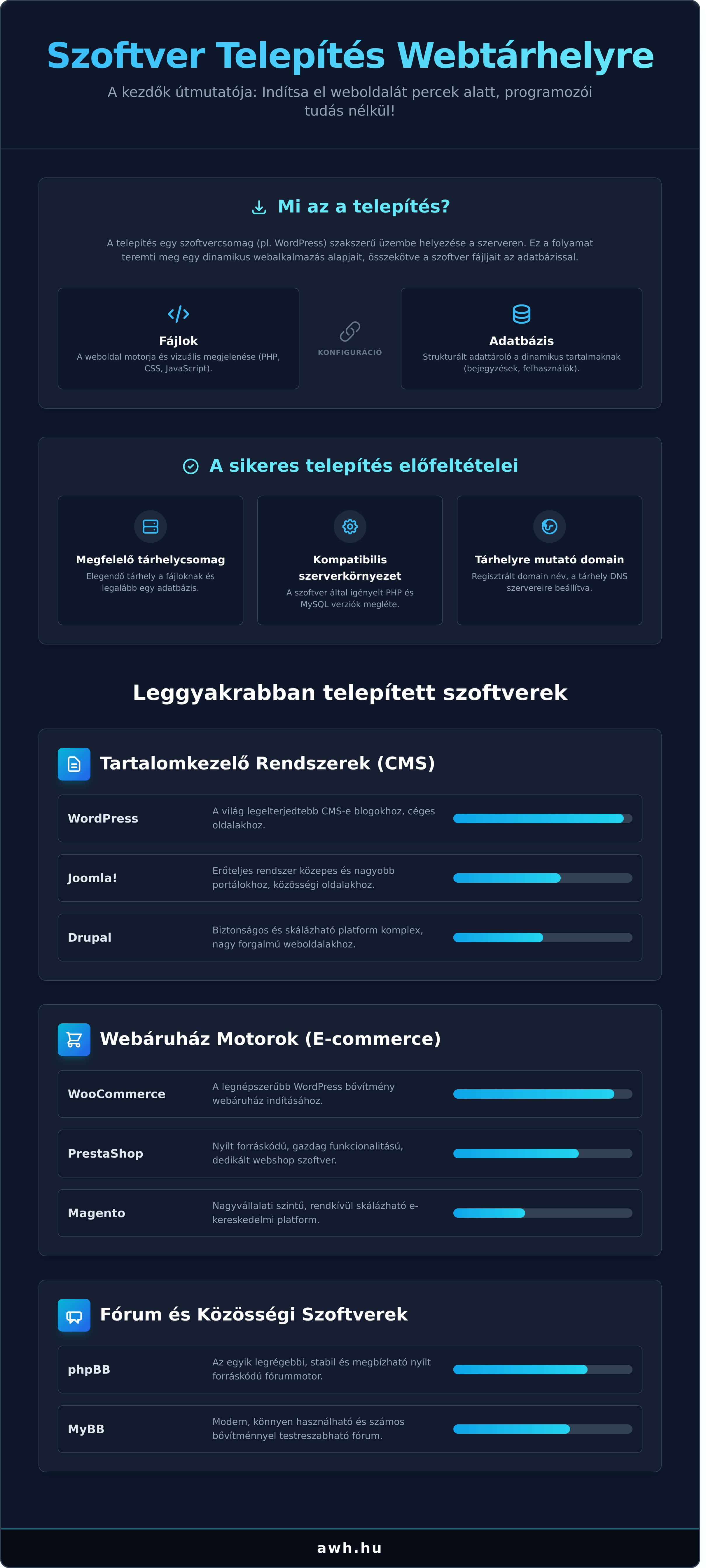
The process rests on two fundamental pillars: the software files and the database. The files (PHP, CSS, JavaScript) form the engine and visual appearance of the website – they are responsible for the logic, design and interactivity. In contrast, the database (usually MySQL or MariaDB) is a structured data repository that houses dynamic content: blog posts, product information, user accounts and settings. During installation, the system creates a configuration file that links these two elements, ensuring seamless communication.
What are the prerequisites for a successful installation?
For a successful installation, it is essential that certain technical requirements are met. Without these, the process may encounter errors right from the start, which can lead to unnecessary delays and frustration.
- The right hosting plan: The plan you choose must have sufficient storage space for your files and must include the option to create at least one database. Check the storage capacity and the number of databases before purchasing.
- Compatible server environment: The software to be installed (e.g. WordPress, Joomla) has its own system requirements, such as a specific version of PHP and MySQL. The server must be compatible with these to ensure stable operation.
- Domain name pointing to the web hosting: The domain name must be registered, and its name servers (DNS) must be configured to the values provided by the web hosting provider so that visitors can access the newly installed website by typing the address into their browser.
The most common software you can install on your hosting account
When we talk about the software behind a website, most people immediately think of WordPress. Whilst its popularity is beyond question, the range of applications that can be installed on a hosting account is much wider than that. These programs provide us with powerful tools for content management, online sales or even building our own community. Modern web hosting providers have greatly simplified the process: with automated, one-click installers, software can be installed in a matter of minutes, even without in-depth technical knowledge.
Content Management Systems (CMS)
CMS platforms (Content Management Systems) allow us to manage and update the content of our website via an administration interface, without the need for programming knowledge. The most popular options are as follows:
- WordPress: The world’s most widely used CMS. Thanks to its flexibility and vast range of plugins, it is the ideal choice for blogs, company websites and simpler online shops.
- Joomla!: A powerful and versatile system that is ideally suited to the reliable operation of medium-sized and larger portals, social networking sites or intranet systems.
- Drupal: A platform that is popular amongst developers, extremely secure and highly scalable. It provides a stable foundation for complex, high-traffic websites and enterprise-level applications.
E-commerce Platforms
If your aim is to sell online, dedicated e-commerce software offers a professional and secure solution for managing products and processing transactions.
- WooCommerce: Technically a WordPress plugin, but it has now grown to become the most popular online shop solution. It’s the perfect choice for anyone looking to launch an online shop within the WordPress ecosystem.
- PrestaShop: An open-source software package developed specifically for online shops, offering a wealth of features and a user-friendly administration interface.
- Magento (Open Source): The pinnacle of enterprise-level e-commerce. It offers exceptional scalability and customisability, and is primarily recommended for companies with a large product range and high turnover.
Forum and Community Software
Creating your own online community is an excellent way to increase visitor engagement and build brand loyalty. Software specialising in this area includes:
- phpBB: One of the oldest and most popular open-source forum engines, providing a stable and reliable foundation for communities on any topic.
- MyBB: A modern, user-friendly forum software that can be customised with numerous add-ons; it is quick to install and easy to manage.
Choosing the right software always depends on the project’s objectives. However, it is important to emphasise that, whichever application you choose, secure installation and regular maintenance (updates, backups) are essential. To avoid vulnerabilities, it is worth being aware of the list of the most common security risks and taking proactive measures to protect against them, so that both our website and our users’ data remain secure.
How does the installation work? From basic to advanced
Installing the software that powers a website (such as a WordPress content management system) used to require considerable technical knowledge. Today, this process has been significantly simplified, and you don’t need to be a programmer to carry out the task. Modern web hosting providers offer tools that allow you to complete the job in a matter of minutes. To lay the right foundations, it’s worth reading a comprehensive guide to choosing a web hosting provider, which will help you understand the background to the process. There are two main approaches: the automated, one-click solution and manual installation, which gives more experienced users greater control.
One-click installers (e.g. WP Toolkit, Softaculous)
For most users, this is the quickest and most convenient method. The application installers available via the hosting control panel (such as cPanel’s WP Toolkit, Softaculous or KeyHelp’s application installer) install popular software in just a few clicks. On aWh’s cPanel hosting, WordPress is installed via the WP Toolkit (step by step), whilst on web hosting, KeyHelp’s application installer handles WordPress, Joomla, Drupal and Nextcloud. The process is extremely simple: you select the software you want, enter some basic details (e.g. website name, administrator password), and the tool automatically creates the database, uploads the files and carries out the configuration.
The manual installation process (for advanced users)
When you need full control or want to install bespoke software, the manual method is the solution. Although it involves several steps and requires greater expertise, it allows for more precise configuration. The general process for manual installation is as follows:
- 1. Downloading the software: Download the installation package (usually in .zip format) from the software’s official website.
- 2. Uploading files: Use an FTP client (e.g. FileZilla) to connect to your hosting account and upload the extracted files to the appropriate folder (usually the
public_htmldirectory). - 3. Creating a database: In the cPanel interface, use the ‘MySQL Database Wizard’ to create a new database, along with a user and password for it. Make a note of these details.
- 4. Running the installer: Open your domain name in a web browser. This will launch the software’s installation wizard, which will guide you through the setup and prompt you for the database connection details you created earlier.
Installation and security: What should you look out for to avoid problems?
When optimising a website, we often focus on speed and search-engine-friendly content, yet security is the foundation of any digital presence. Protecting your website begins right from the very first step: selecting and installing the software. An installation carried out unprofessionally or in a hurry can leave security vulnerabilities in the system that malicious attackers can later exploit with ease. Fortunately, by following a few basic rules, these risks can be significantly reduced.
Official source and strong passwords
The first and most important rule for laying secure foundations is to always download your chosen content management system (e.g. WordPress, Joomla, Drupal) from the official developer’s website. Avoid versions from unknown sources, cracked or ‘nulled’ versions, as these are almost guaranteed to contain malicious code or backdoors. During the installation process, pay particular attention to setting up the administrator account. Use a unique, strong password that includes:
- Upper and lower case letters
- Numbers
- Special characters (e.g. !, ?, #, %)
Changing the default settings
Attackers often scan the internet using automated software (bots) that search for systems’ default settings. With just two simple changes, you can make their job considerably more difficult. Firstly, if your system allows it, do not use the username “admin” for your main account. Choose a unique name instead. Secondly, change the default prefix for database tables, which in WordPress is typically wp_. A unique prefix (e.g. awh7_) prevents common, automated SQL injection attacks.
The role of updates after installation
A successful installation does not mean the job is done; in fact, that is only the beginning. Software developers are constantly identifying and fixing security vulnerabilities. Regularly updating your website’s core software, themes and plugins is essential for maintaining security. An out-of-date plugin is the most common point of entry for attackers. A system kept up to date is not only more secure, but also often guarantees faster and more stable performance, which is crucial for the overall optimisation of your website. Reliable hosting providers, such as aWh, provide an environment where these updates can be carried out easily and securely.
Why is reliable hosting crucial for installation?
Installing the software that powers your website (e.g. WordPress, Joomla, Drupal) is the first crucial step towards establishing an online presence. However, the quality of the hosting service you choose fundamentally determines not only the speed of the process, but also its success. A slow, unstable or poorly configured server can lead to errors, interrupted processes and unnecessary frustration right from the start, which can derail the entire project. In contrast, a professional hosting provider not only ensures a fast and stable foundation, but also takes a significant portion of the technical burden off your shoulders. With over 10 years’ experience, aWh guarantees that your software will run in the most optimal and state-of-the-art environment right from the very start.
Server environment and compatibility
Modern content management systems and web applications are constantly evolving, which requires up-to-date server-side technologies. A compatible version of PHP and MySQL/MariaDB is a prerequisite for successful installation. If the server is running out-of-date software, this not only poses a serious security risk, but may also cause the installer to simply return an error. Furthermore, critical server settings such as the correct memory_limit or max_execution_time ensure that even the installation of larger plugins or more complex templates runs smoothly. At aWh, we take care of this automatically: all our hosting plans run on fast NVMe SSDs with the latest software versions, so you don’t have to worry about server configuration.
Automation and support
Reliable hosting is not just about the hardware, but also about the complementary services that support your work. Time is the most valuable resource, which is why we provide tools that significantly speed up your workflows and make them more secure:
- One-click installers: With tools available on control panels such as WP Toolkit or Softaculous, you can install hundreds of the most popular systems in a matter of minutes, without any technical knowledge. There is no longer any need for manual database creation or file uploads.
- Automatic backups: A failed update or a poorly configured plugin no longer spells disaster. From our regular backups stored on an external server, you can restore your website to a previous, stable state at any time with just a few clicks.
- Expert support team: Should you get stuck during the process or have a specific query, our experienced team will be happy to help resolve any issues that arise, either by telephone or via a ticket.
Don’t leave the foundations of your website to chance. With a stable and well-supported hosting plan, installing software becomes a quick and hassle-free process. Check out our fast and reliable WordPress hosting plans!
Summary: The key to a successful installation is a stable foundation
Our guide has shown that installing software on a web hosting account is no longer a daunting task. The key is to be aware of the options – from one-click solutions to manual procedures – and to always prioritise security. This knowledge will give you the confidence you need to launch your own website, blog or online shop.
However, the most important factor for a smooth start is a reliable and modern web hosting service. A professional provider takes most of the technical burden off your shoulders, so installing software is not an obstacle to be overcome, but a simple, quick step towards your goals. At aWh, with over 10 years’ experience, we provide our customers with precisely this stable foundation.
All our web hosting plans include our automated, one-click software installer, which allows you to set up the most popular systems in a matter of minutes. And should you have any questions, our expert support team is always on hand to help. Choose a reliable web hosting provider where installation is a breeze!
Launch your online project with confidence, backed by a stable and supportive infrastructure!
Frequently Asked Questions about installation
Do I need to know how to code to set up a WordPress website?
No, you don’t need any programming knowledge at all. Modern web hosting services, such as those offered by aWh, include an application installer: the WP Toolkit on cPanel hosting and KeyHelp’s application installer on web hosting. With these tools, you can install WordPress, Joomla or other popular content management systems in just a few clicks, as part of an automated process. The system handles every technical step – such as creating the database and copying the files – automatically.
What is an application installer, and why is it useful for me?
An application installer (such as WP Toolkit, Softaculous or the KeyHelp installer) is a tool built into the hosting control panel that allows you to install blog engines, online shops and other software quickly, without the need for manual intervention. On aWh’s hosting plans, WP Toolkit is available in cPanel, whilst the KeyHelp application installer is available on the web hosting platform. The advantage is that it takes the technical burden off your shoulders: it automatically handles database settings, file permissions and basic configuration, so you can focus on your website’s content.
How much software can I install on my web hosting account?
The number of software applications that can be installed is primarily determined by the storage included in your chosen web hosting plan and the limits on the number of databases. In theory, you can install as many applications as the available resources can accommodate. However, it is important to monitor storage and CPU usage via the cPanel interface to ensure that all your websites operate stably and with outstanding performance.
What should I do if I get an error message during installation?
If you receive an error message, the first step is to note down the exact message, as this often indicates the source of the problem (e.g. an incorrect PHP version or an incorrect database password). It is worth checking our Knowledge Base, where you can find solutions to common errors. If the problem persists, our experienced support team is on hand to help. Please open a ticket and attach the error message to ensure a swift investigation.
Will my website be available immediately after the software has been installed?
Yes, once the installation process has been successfully completed, your website will usually be accessible immediately via your domain name. The installer also provides the exact URL for both the website and the admin panel. It is important to note that if you have just registered the domain name or recently pointed it to our servers, it may take a few hours for the site to become accessible from all internet service providers’ networks due to global DNS propagation.
Will aWh’s support team help me if I get stuck with the installation?
Of course. Although we have designed our systems and automated tools to make software installation as straightforward as possible, we realise that questions may arise. Our expert support team, with over 10 years’ experience, is on hand to help if you get stuck at any stage of the installation. Please get in touch with us, and we’ll help ensure the process runs smoothly.