 English
 Magyar


In web hosting services, particularly on Linux-based servers, you will often come across the term ‘inode’. Put simply, every file and every folder on your hosting account occupies one inode, so the inode count is effectively the number of files and folders.
What is an inode?
In Linux file systems, the inode (index node) is the data structure that describes the details of a file or directory: its type (file, directory, link), its size, its owner, its permissions, the time it was created and modified, and where its contents are located on the disk. The file name is not stored in the inode, but in the directory, which associates the name with the inode.
The number of inodes is determined when the file system is created, so a disk can ‘run out of space’ even if there is still free space on it, provided that the inodes have been exhausted. This often occurs with a large number of small files.
Why are there limits on hosting?
Managing files (backup, scanning for viruses, listing directories) requires resources, and a large number of small files also puts a strain on the server’s disk space. On shared hosting, providers therefore limit not only the storage (measured in gigabytes) but also the number of files, to ensure that one account does not slow down the others. The article on resource limits for cPanel hosting plans discusses these per-plan limits.
Where can you see the inode number?
On cPanel hosting, on the right-hand side of the home page, in the Statistics panel, the ‘File Usage’ row shows the number of inodes used and the limit.
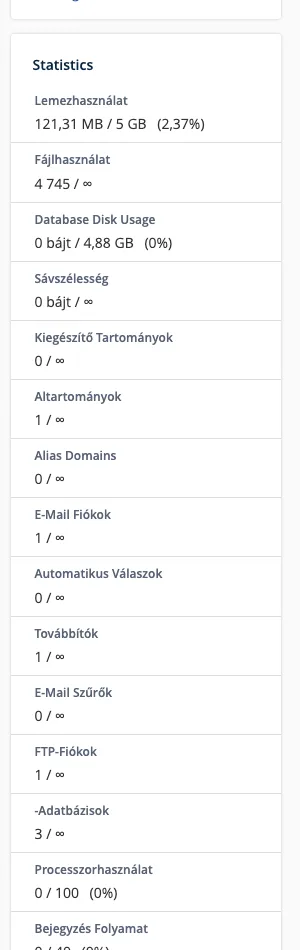
With SSH access, you can use the command du --inodes -d 1 ~ | sort -n in your home directory to see, folder by folder, where the most files are located.
What causes a high number of inodes?
- Cache: WordPress cache plugins can create a separate file for each page, which can amount to tens of thousands of files.
- Email: each email in a mailbox is stored as a separate file, so a mailbox that has not been emptied for years, or a junk mail folder, takes up a lot of inodes.
- Session and temporary files that a faulty application fails to delete.
- Unzipped backups and old website copies, such as a
public_html_regifolder. - Developer directories, such as
node_modulesorvendorfolders, which should not be stored on the server.
What happens when you reach the limit?
- It is not possible to create a new file, so uploading, plugin updates and writing to the cache will also fail.
- Mailboxes are unable to receive new emails.
- The backup may fail.
How can you reduce it?
- Clear the cache in the plugin interface and check whether it is overwriting too many files.
- Delete old emails, spam and the bin folder; the article covers mailbox size, mailbox quotas and how to free up space.
- Remove unused website copies, old backups and installations.
- Empty the File Manager’s bin (
.trash).
Our article on storage explains how to check your storage space by size.