 English
 Magyar


If you’d like to see exactly how much storage space your account is using, and which folder is taking up the most space, the cPanel Disk Usage interface provides a quick overview. It’s worth checking this regularly, as a full storage space not only prevents you from uploading files: it can also prevent you from receiving emails and performing backups.
Accessing the interface
- Log in to your cPanel account.
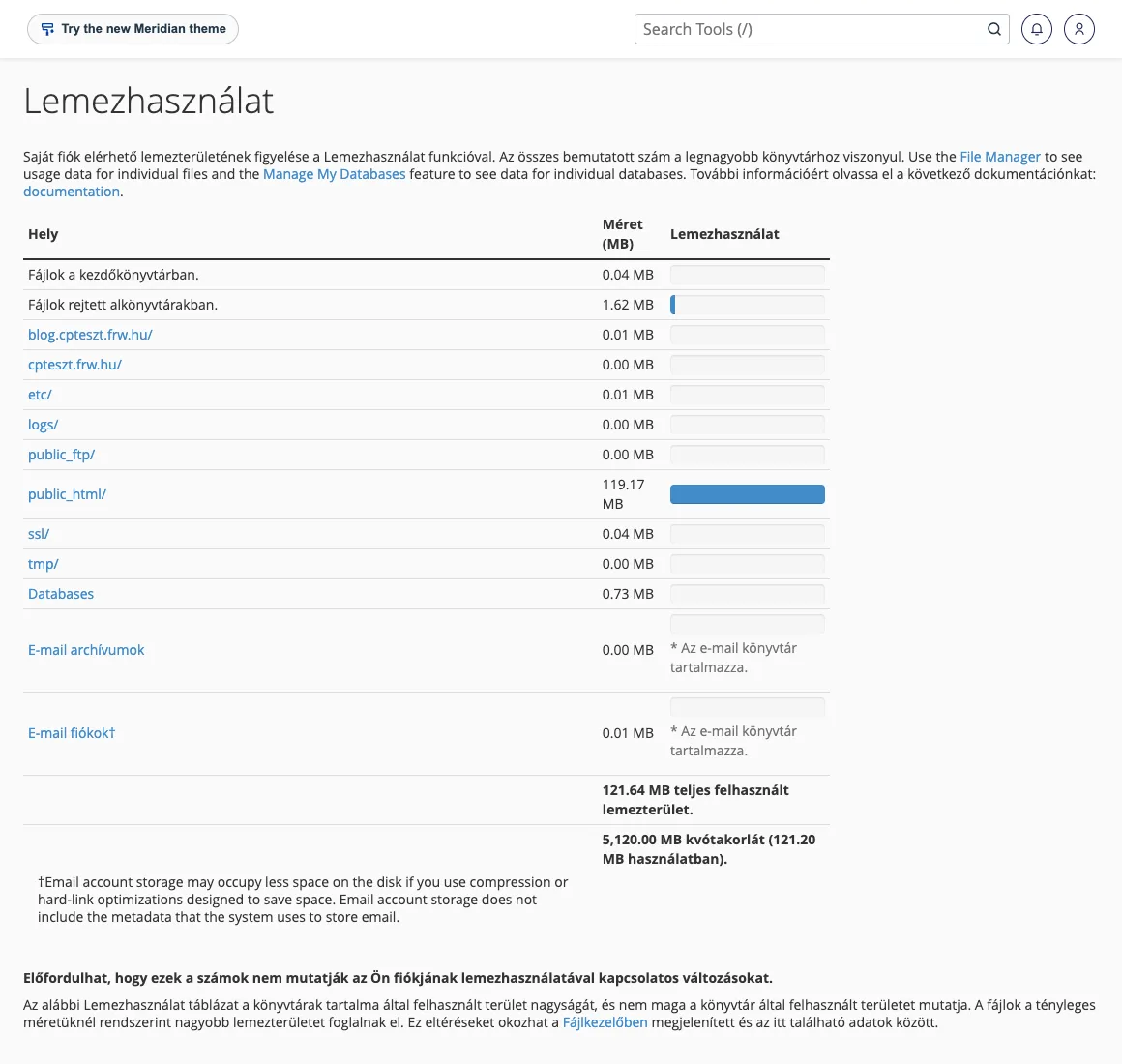
- In the ‘Files’ section, click on the ‘Disk Usage’ icon or type its name into the search box.
You can also view your total storage usage on the right-hand side of the cPanel homepage, in the Statistics panel (under ‘Hosting Usage’), along with the limit associated with your plan.
What does ‘Disk Usage’ show?
- Folders in the home directory: broken down by folder, with a bar chart; the bars are proportional to the largest folder. Clicking on a folder name opens it in File Manager.
- Hidden folders: folders beginning with a full stop (e.g.
.trash,.cache) are displayed as a single entry. - Databases: the size of MySQL databases also counts towards the account’s storage usage.
- mail: mailboxes are located in the
mailfolder; the size of each account is shown on the ‘Email Disk Usage’ page in the Email group.
The directory tree at the bottom of the page displays deeper levels and can be sorted by size. The figures are not always up to date: following a large-scale deletion, it may take some time for the data to refresh.
Where does storage space usually run out?
- Old backups in the home directory (for example,
backup-*.tar.gzfiles) that were left there after being downloaded. We carry out daily backups of the storage space; these files are not required for this purpose. - The File Manager’s Trash (
.trash): files deleted in the File Manager are moved here until you empty the Trash (Empty Trash). - Log files: a faulty PHP script can generate an
error_logfile several gigabytes in size. The article on largeerror_logfiles explains how to locate and delete them. - Cache: the folders for WordPress cache plugins (e.g.
wp-content/cache) can also become very large; please clear these via the plugin’s own interface. - Large mailboxes and email archives: emails, along with their attachments, take up a lot of space. The article on freeing up space in your mailbox explains what to do.
Before deleting anything, always check what is in the folder: the contents of the public_html, mail and etc folders are required for the website and email to function.
Number of files (inodes)
Hosting can be limited not only by the size of files, but also by their number: a large number of small files (cache, session files, emails) can cause problems even if there is still plenty of space available in gigabytes. The article on inodes discusses this in detail.
If you are consistently running out of space
If you regularly find yourself close to the storage limit even after clearing up, it is worth upgrading to a larger hosting plan. cPanel hosting plans offer storage ranging from 2 GB to 100 GB.