 English
 Magyar


The Virtual Data Optimizer (VDO), a data optimisation tool for Red Hat Enterprise Linux-based systems (AlmaLinux, Rocky Linux), compresses and deduplicates data at block level whilst the system is running. This allows more data to be stored on the same disk: it is particularly effective where there is a lot of repetitive content, such as virtual machine images, backups or container images.
How does VDO work?
VDO processes the blocks written to the disk in three steps:
- Filtering out blocks containing only zeros: blocks containing only zeros are not written to the disk, but are simply recorded in the metadata (thin provisioning).
- Deduplication: duplicate blocks are stored as a single copy, with references to them in other locations.
- Compression: the remaining blocks are compressed using the LZ4 algorithm.
The volume may therefore have a larger logical size than the physical disk behind it. The actual space usage must be monitored regularly, as writes will fail if the physical space runs out.
VDO on AlmaLinux and Rocky Linux 9 and 10 (LVM-VDO)
From version 9 onwards, VDO is part of LVM: volumes must be created using the lvcreate command; the old vdo utility is no longer available. We tested these steps on AlmaLinux 9.8 and 10.2.
Install the required packages. AlmaLinux 9:
sudo dnf install lvm2 vdo kmod-kvdo
AlmaLinux 10:
sudo dnf install lvm2 vdo
On AlmaLinux 10, the VDO kernel module is already part of the kernel; there is no separate kmod-kvdo package. If you run command 9 there as well, dnf will stop with the error “Unable to find a match: kmod-kvdo” and will not install the other packages either; in this case, lvcreate --type vdo will return the error /usr/bin/vdoformat: execvp failed.
Create a volume group on the empty disk (/dev/sdb in this case), then create a VDO volume within it with a physical size of 100 GB and a logical size of 300 GB:
sudo pvcreate /dev/sdb
sudo vgcreate vg_vdo /dev/sdb
sudo lvcreate --type vdo --name vdo1 --size 100G --virtualsize 300G vg_vdo
The test was completed without error on both systems using a volume with a physical size of 5 GB and a logical size of 15 GB (--size 5G --virtualsize 15G).
Format it using the XFS file system (the -K) option prevents unnecessary block discarding during formatting), and mount it:
sudo mkfs.xfs -K /dev/vg_vdo/vdo1
sudo mkdir -p /mnt/vdo1
sudo mount /dev/vg_vdo/vdo1 /mnt/vdo1
To mount permanently, add the following to the /etc/fstab file:
/dev/vg_vdo/vdo1 /mnt/vdo1 xfs defaults 0 0
VDO on AlmaLinux and Rocky Linux 8
We have not tested this section; it follows the Red Hat documentation. In version 8, VDO still has its own management program (this was removed in version 9):
sudo dnf install vdo kmod-kvdo
sudo vdo create --name=my_vdo --device=/dev/sdb --vdoLogicalSize=100G
sudo mkfs.xfs -K /dev/mapper/my_vdo
sudo udevadm settle
sudo mount /dev/mapper/my_vdo /mnt
The vdo list command lists the volumes created, whilst vdo status --name=my_vdo displays the details of a volume. Before upgrading from version 8 to version 9, the old VDO volumes must be converted to LVM-VDO volumes (using the lvm_import_vdo command).
Checking your credit balance and reservation status
For both versions, the vdostats command shows how much physical space the data occupies and how much has been saved:
sudo vdostats --human-readable
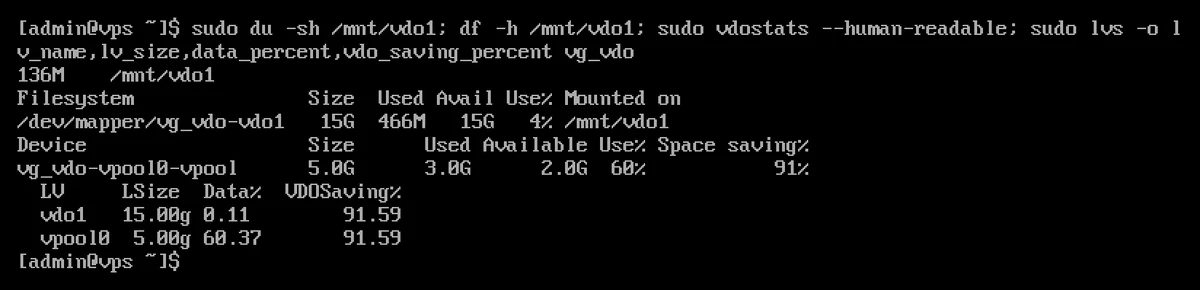
In the test, the documentation copied six times onto the 15 GB volume amounted to 136 MB (du), representing a saving of 91 per cent. Nevertheless, it occupied 3 GB of the 5 GB physical space: this is the amount of space VDO itself reserves for the deduplication index and metadata, even on an empty volume (on AlmaLinux 9, it was also 3 GB). VDO therefore makes no sense on a small volume; it pays off on larger volumes (at least several tens of GB) containing a lot of repetitive data.
The Use% column shows the physical space utilisation: if it rises above 80 per cent, increase the physical size (using the lvextend command for LVM-VDO) or delete some data. For a general guide to checking disk usage, see the article on the ‘du’ and ‘df’ commands.
When is it not worth using VDO?
Even with compressed data (videos, images, ZIP archives, encrypted files), VDO saves very little space, whilst using up processor power and memory. In such cases, a simple volume is the better choice.