 English
 Magyar


SELinux (Security-Enhanced Linux) is enabled by default on AlmaLinux, Rocky Linux and other RHEL-based systems. In addition to the usual file permissions (see: File permissions (chmod, chown) on Linux), it assigns a security label (context) to every file, process and port, and only permits actions that are explicitly allowed by the policy. For example, if the web server is compromised, SELinux prevents the attacker from accessing other parts of the system on behalf of the web server.
The downside of this is that non-standard settings (custom web directory, non-standard port, outbound connections from the web server) may result in a ‘Permission denied’ error, even if the chmod and chown settings are correct. In such cases, many people disable SELinux, even though the error can usually be fixed with a single command.
Ubuntu and Debian use AppArmor rather than SELinux; this article does not apply to those systems. On cPanel servers, SELinux must be disabled, as cPanel does not support it.
Is it switched on?
getenforce
sestatus
Enforcing: SELinux is active and blocks unauthorised operations.Permissive: only logs rule violations, but does not block them.Disabled: switched off.
Is SELinux causing the error?
SELinux logs every denial as an AVC message. The most recent denials:
sudo ausearch -m AVC -ts recent
If a denied line appears here at the same time as the error, the error is caused by SELinux. A typical entry:
type=AVC msg=audit(...): avc:  denied  { read } for  pid=1234 comm="httpd"
  name="index.html" scontext=system_u:system_r:httpd_t:s0
  tcontext=unconfined_u:object_r:admin_home_t:s0 tclass=file
This suggests that the web server (httpd_t) was unable to read the index.html file because its label is admin_home_t (it was created in the root directory).
ausearch only reads the log automatically if you run it from the terminal. When running it from a script or a cron job, you must also specify the --input-logs switch (sudo ausearch --input-logs -m AVC -ts recent), otherwise it will read the standard input and return <no matches>. The -ts recent option refers to the last 10 minutes.
As a quick test, you can temporarily switch to permissive mode; if this resolves the issue, it is definitely caused by SELinux:
sudo setenforce 0   # Permissive
# ... próbálja ki újra ...
sudo setenforce 1   # vissza Enforcing módba
The audit2why program also explains the reasons for bans in plain language:
sudo ausearch -m AVC -ts recent | audit2why
The following commands – semanage, audit2why and audit2allow – are included in the policycoreutils-python-utils package:
sudo dnf install policycoreutils-python-utils
1. Incorrect file labels
The most common scenario is when a file is created elsewhere (for example, in the /root or /home directory) and then moved to the web directory using the mv command. The mv command retains the original permissions, meaning the web server cannot read the file. (The cp command assigns the permissions of the destination directory to the copy.)
View tags:
ls -Z /var/www/html
Resetting tags to their default values:
sudo restorecon -Rv /var/www/html
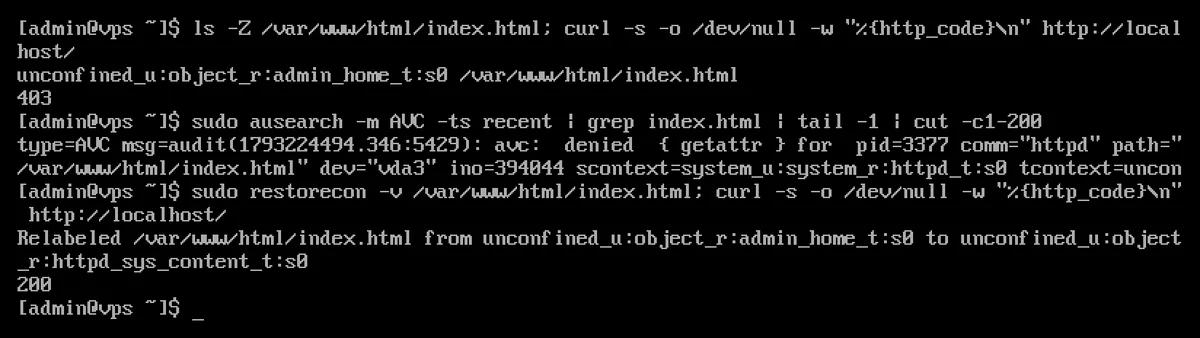
On an AlmaLinux 10 test machine, the index.html file created in the /root directory and then moved to the web directory using the mv command returned a 403 error; the log showed that access was denied, but after running restorecon, the page loaded with a 200 status code:
Personal web directory
If the website is not located under /var/www (for example, /srv/www), tell SELinux that this is also web content, then set the labels:
sudo semanage fcontext -a -t httpd_sys_content_t "/srv/www(/.*)?"
sudo restorecon -Rv /srv/www
For those directories to which the web application also needs to write (uploads, cache), set the ‘writable’ flag:
sudo semanage fcontext -a -t httpd_sys_rw_content_t "/var/www/html/wp-content/uploads(/.*)?"
sudo restorecon -Rv /var/www/html/wp-content/uploads
Labels can also be modified using the chcon command, but any label set in this way will be lost after the next restorecon or a complete relabelling; for a permanent setting, semanage fcontext is the correct method.
2. Toggles (Booleans)
Many common requirements can be met using the SELinux switches. The switches relating to the web server are:
getsebool -a | grep httpd
The most frequently required ones are:
| Switch | When is it needed? |
|---|---|
httpd_can_network_connect |
PHP establishes an external connection (API calls, cURL) or forwards requests to an application (Node.js, Python) via an Nginx/Apache proxy |
httpd_can_network_connect_db |
PHP is connected to a database located on another server |
httpd_can_sendmail |
PHP sends an email using the mail() function |
httpd_unified |
The web server can also write all web content (convenient, but less secure) |
Enable permanently (resets on reboot without the -P option):
sudo setsebool -P httpd_can_network_connect on
In the test, a PHP script attempted to access an external HTTPS page using cURL. With the setting disabled (httpd_can_network_connect --> off, which is the default), cURL returned error 7 (“Failed to connect to … port 443 … Could not connect to server”); after enabling it, the response was 200. In WordPress, this appears as a “cURL error 7” message (see: cURL errors 28 and 60 in WordPress).
3. Non-standard ports
If you run a service on a port other than the default one, you must also inform SELinux of this. The most common example is changing the SSH port (see: SSH server security settings): if you omit this, sshd will not start after a restart, and you may lock yourself out of the server.
sudo semanage port -a -t ssh_port_t -p tcp 2255
For web servers (for example, 8888 instead of 8080):
sudo semanage port -a -t http_port_t -p tcp 8888
The ports that are already enabled are: sudo semanage port -l | grep -E "ssh|http".
4. A special rule, if nothing else helps
If none of the above solutions work, audit2allow creates a custom rule module from the logged blocks:
sudo ausearch -m AVC -ts recent | audit2allow -M sajat_szabaly
sudo semodule -i sajat_szabaly.pp
Before installation, check the sajat_szabaly.te file that has been created and only allow what is actually required.
Should SELinux be disabled?
We do not recommend this. However, if an application does not work with it, rather than disabling it completely, you can simply set the relevant service to permissive mode, for example the web server:
sudo semanage permissive -a httpd_t
If you do need to disable it, from AlmaLinux 9 onwards, setting SELINUX=disabled in the /etc/selinux/config file will no longer disable SELinux completely; instead, specify it as a kernel parameter and then restart the server:
sudo grubby --update-kernel ALL --args selinux=0
If you switch it back on later, the entire file system will need to be relabelled (run sudo touch /.autorelabel and then restart the system), which may take some time.