 English
 Magyar


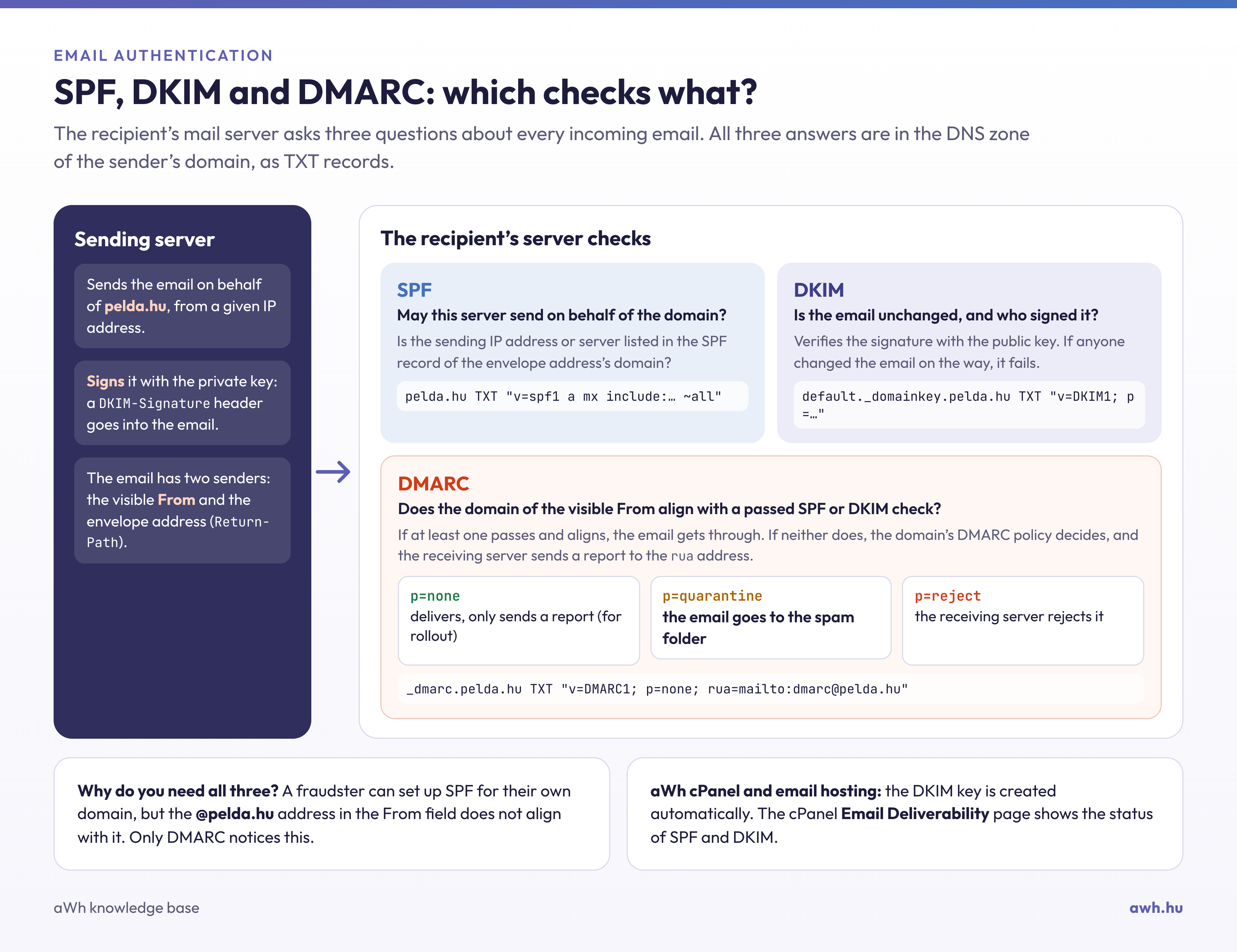
The SPF (Sender Policy Framework) record is a TXT record that specifies which domain names are authorised to send emails from the server (or, conversely, from which servers emails may be sent using a particular domain name). Its primary purpose is to limit email spoofing, and it is most effective when combined with a DMARC record.
The history of SPF
SPF was first mentioned in 2000. Over the following years, the SPF specification evolved through several drafts. In the meantime, the original name ‘SPF’ (Sender Permitted From) was changed to ‘Sender Policy Framework’.
The IETF SPF Working Group attempted to merge SPF with Microsoft’s CallerID proposal. The next attempt involved the ‘classic’ version of SPF. This led to the first experimental RFC in 2006, and eventually, in 2014, to the proposed standard for SPF, which became known as RFC 7208 in 2014.
Today, email authentication techniques similar to SPF have evolved, leading to technologies such as DKIM and DMARC. SPF still plays an important role in determining whether an email is DMARC-compliant.
SPF in practice
An SPF record is a DNS record that must be added to the domain’s DNS zone. In this SPF record, you can specify which IP addresses and/or hostnames are authorised to send email from that domain.
The recipient of the email will use the ‘envelope from’ address (usually the Return-Path header) to verify that the sender’s IP address was authorised to send it. This happens before the body of the message is received. If the sending email server is not listed in a given domain’s SPF record, then email arriving from that server is classified as suspicious, and the recipient may reject it.
Here is an example of an SPF record:
v=spf1 a:mail.solarmora.com ip4:192.72.10.10 include:_spf.google.com ~all
Let’s break down the string character by character and see what each part means:
- v – Specify the version of the SPF record used. The version must always be ‘spf1’, as this is widely recognised by downstream servers.
- + - This is an attribute and stands for ‘pass all’.
- mx – Defines the DNS MX record of the current (or specified) domain as a valid sending source.
- a – Specifies the DNS A record for the current (or specified) domain name as a valid sending source.
- ip4:<IP> – This is similar to the two above, but in this case the mail server compares the IP address or IP address range specified after ‘ip4:’ with the IP address of the sending server.
- ip6:<IP> – Same as above, but with IPv6 addresses and ranges.
- include – Loads the SPF records for another domain name.
- ~ - This is another attribute that refers to the term ‘soft fail’. This attribute means that the sender fails the SPF check, but the email is not blocked; instead, it is marked as spam.
- - (minus sign) - This is also an attribute; however, if used, any email matching that element will be immediately discarded or rejected.
- all – Any value that has not previously been specified or explained in detail.
How can this be checked?
You can check a domain’s SPF record using our free SPF checker: the tool expands the include elements and indicates if the record exceeds the limit of 10 DNS queries. This includes all include, a, mx and redirect records, as well as those contained in the referenced records; if the limit is exceeded, the receiving servers will ignore the entire record. The same applies if the domain has two SPF records. You can also use the tool to check whether a specific sending IP address complies with the record. The record can be queried from the command line as follows:
dig TXT pelda.hu +short
What SPF isn’t good for
SPF is an excellent technique for authenticating emails. However, there are a few limitations you should be aware of.
- SPF does not validate the ‘From’ header. In most clients, this header appears as the actual sender of the message. SPF does not validate the ‘From’ header, but determines the sender’s domain based on the ‘envelope from’ field.
- The SPF check fails when an email is forwarded. In this case, the ‘forwarder’ becomes the message’s new ‘sender’, and it will not pass the SPF checks carried out by the new destination. The SRS (Sender Rewriting Scheme) technology was developed to eliminate this issue.
- SPF does not have a reporting function, which makes it difficult to maintain.