 English
 Magyar


DMARC (Domain-based Message Authentication, Reporting and Conformance) is a TXT record published in a domain’s DNS zone. In this record, the domain owner instructs receiving mail servers what to do with emails arriving on behalf of the domain but failing authentication, and where to send a report regarding this. DMARC is not a standalone verification method: it is based on the SPF record and the DKIM signature.
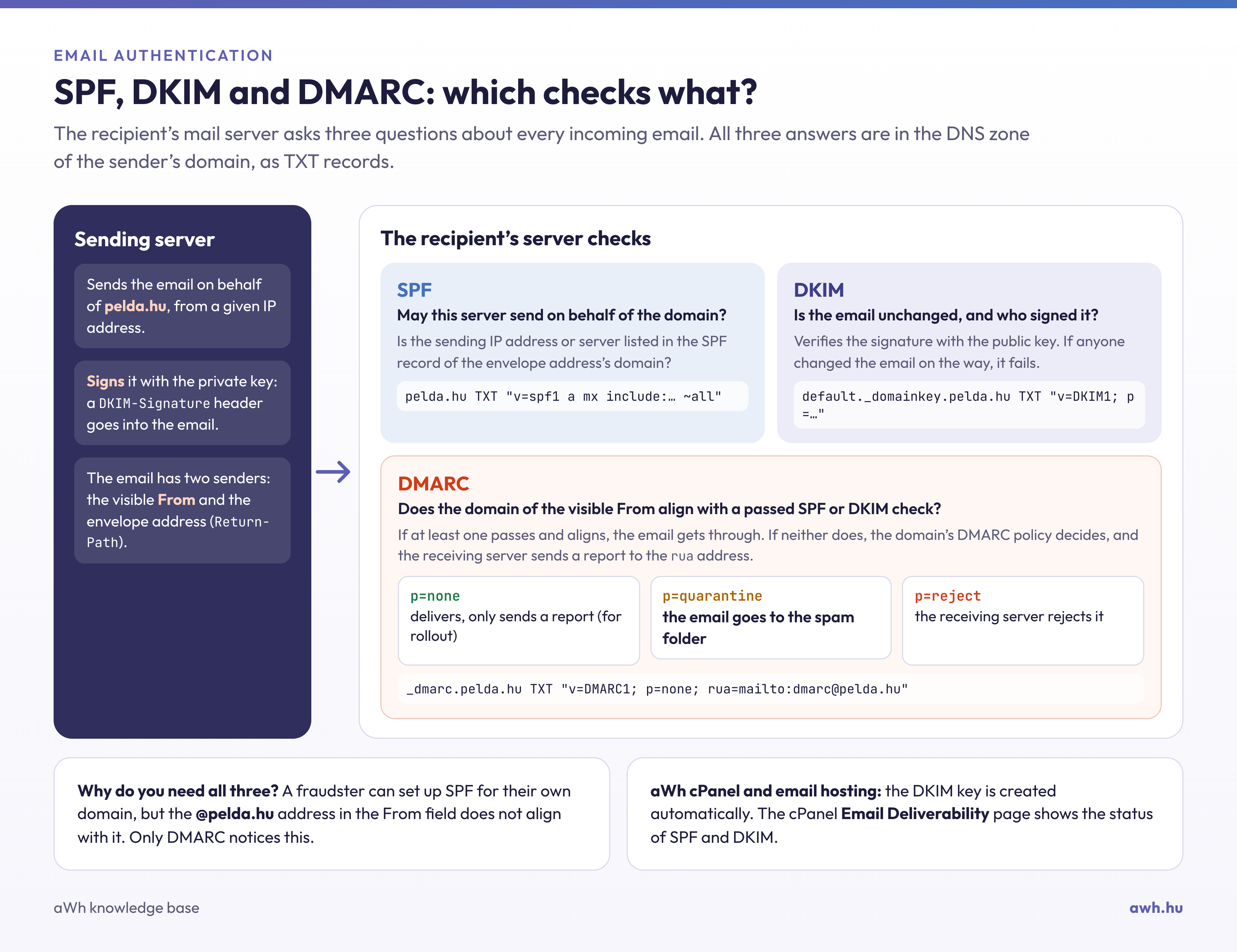
How does it work?
When an email arrives, the receiving server:
- checks the SPF (whether the sending server is authorised to send emails on behalf of the domain) and the DKIM signature;
- checks the alignment: the domain shown in the ‘From’ field of the email must match the domain verified by SPF or signed with DKIM;
- If at least one of the checks is successful and matches, the email passes DMARC; if none do, it proceeds according to the rule specified in the domain’s DMARC record.
DMARC is effective because of this alignment: a fraudster may configure SPF for their own domain, but the address entered in the ‘From’ field, with an extension that ends with your domain, will not match.
The structure of the record
The record is placed on the _dmarc subdomain, for example with the name _dmarc.pelda.hu:
v=DMARC1; p=none; rua=mailto:dmarc@pelda.hu; adkim=r; aspf=r
v=DMARC1– the version; this is mandatory and must appear at the start of the record.p– the rule:none(monitoring only; delivery remains unchanged),quarantine(the faulty email is moved to the spam folder) orreject(the receiving server rejects it).sp– a separate rule applies to subdomains; if this is missing, the value ofpalso applies to them.rua– this is the address to which receiving service providers send their summary reports (in XML format), which show which servers are sending emails on behalf of the domain and whether they pass the checks.adkim,aspf– match strictness:r(loose, subdomains are also accepted) ors(strict, exact match).
The new DMARC standard published in 2026 (RFC 9989) has dropped the previous pct tag and introduced the t=y (test mode) tag for testing the rule. Old records will continue to work, but it is no longer advisable to include pct in new records.
Step-by-step guide
- Check that SPF and DKIM are set up correctly. On cPanel hosting, the Email Deliverability page displays both.
- Add the record using the
p=nonerule and aruavalue. In cPanel, you can do this on the Zone Editor page by creating a new TXT record; if you manage your domain’s DNS elsewhere, you will need to add it there. - Please monitor the reports for a few weeks. If any service sending emails on behalf of your domain (such as a newsletter service, online shop or invoicing program) is not listed in the SPF record or is not signed with DKIM, this must be rectified now.
- If all your own emails are now getting through, switch to the
p=quarantinerule, and later to thep=rejectrule.
You can view the record using the command dig TXT _dmarc.pelda.hu +short or via an online DMARC checker. In the header of a sent email, the entry dmarc=pass indicates that everything is in order.
Common errors
- Two DMARC records with the same name: in this case, the receiving servers will ignore both of them.
- Immediate
p=reject: if a sending service is missing from the SPF or DKIM records, its emails will be rejected immediately. - Unread
ruatitle: without the reports, it’s impossible to tell what’s going wrong.
Why is it now mandatory?
Since February 2024 for Gmail and Yahoo, and since May 2025 for Microsoft (Outlook.com, Hotmail), anyone sending at least 5,000 emails to them per day is required to use SPF, DKIM and a DMARC record with at least the p=none rule, with a matching sender domain. It is also recommended for lower volumes, as it makes it more difficult to spoof the domain. The DMARC record can also be configured for our email hosting plans. Details of the setup are provided in our blog’s step-by-step guide to configuring the DMARC record.