 English
 Magyar


Incoming mail servers score every incoming email, and if the score exceeds a certain threshold, the email is sent to the spam folder or is not accepted by the server at all. Today’s filters do not focus on individual words, but rather on a combination of many indicators. The most common reasons are as follows.
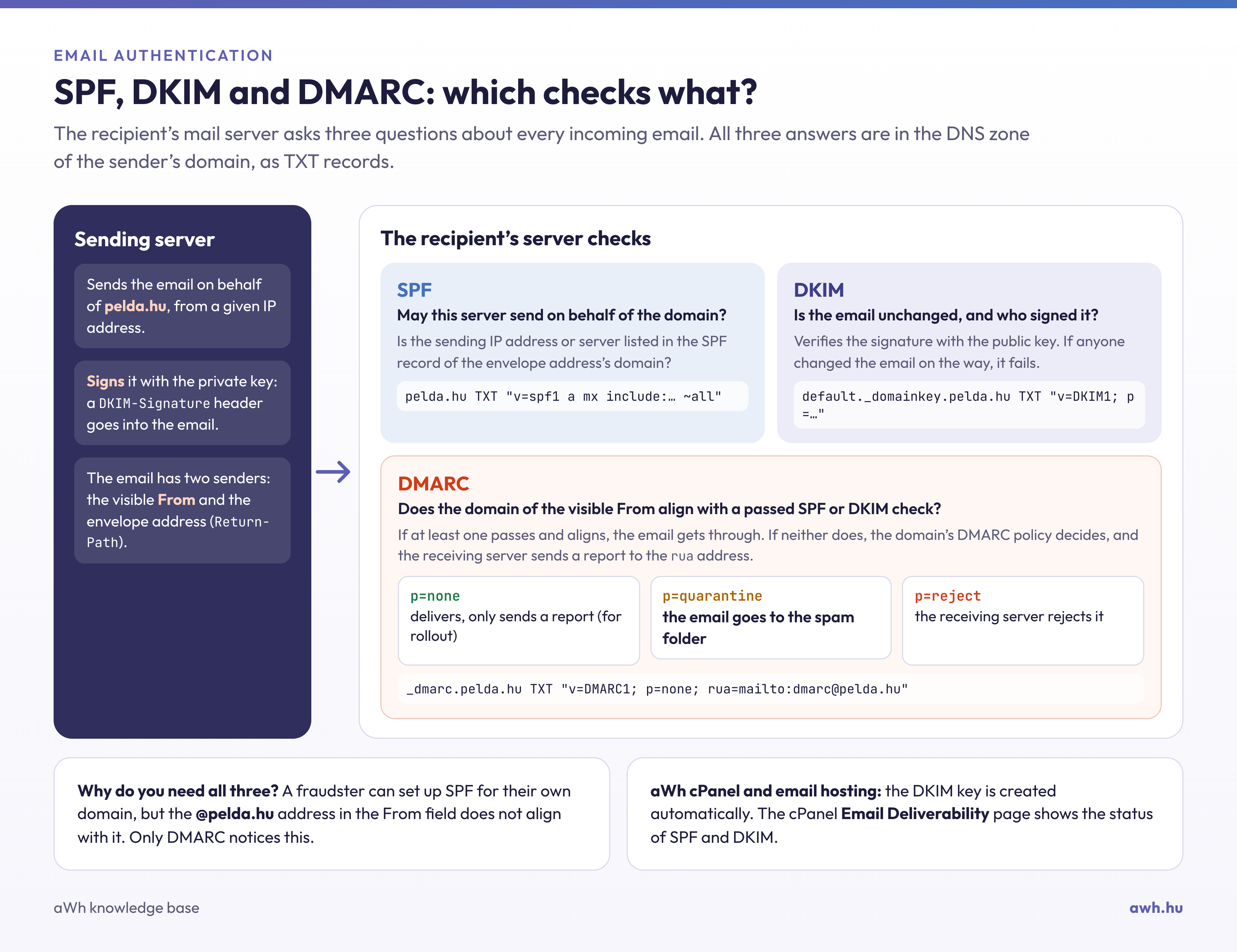
1. Missing or incorrect authentication
The receiving server checks whether the sending server is authorised to send emails on behalf of the domain (SPF), whether the email is intact and has been signed by the domain (DKIM), and whether the domain shown in the ‘From’ field matches these (DMARC). If any of these are missing or fail, the email is much more likely to end up in the spam folder. It is common for an online shop, invoicing program or newsletter service to send emails on behalf of the domain but not to be listed in the domain’s SPF record.
2. The sender’s IP address and the domain’s reputation
Service providers monitor the amount of unsolicited email sent from an IP address or domain. If a server or a compromised account has sent spam, the address may be blacklisted (for example, on the Spamhaus lists). New domains and IP addresses that have not yet sent any emails are also subject to more cautious scrutiny until their reputation is established.
3. Recipients’ reactions
Major service providers (Gmail, Outlook.com, Yahoo) monitor whether recipients open, reply to or mark emails as spam. If a large number of people mark an email as spam, the sender’s future emails will also be categorised as spam, even those sent to recipients who have not complained.
4. Content and format
- just an email consisting of a single large image, with very little text;
- link shorteners, multiple links, or link addresses that differ from the displayed text;
- a subject line consisting entirely of capital letters, exclamation marks and misleading text;
- an executable or password-protected attachment;
- Incorrect HTML or missing text version.
5. Technical settings
A missing reverse DNS (PTR) record, an unencrypted connection, or an email with an incorrect date or an incomplete header will result in points being deducted. These issues mainly occur when using your own mail server (for example, on a VPS).
6. Bulk sending
From 2024, Gmail and Yahoo, and from 2025, Microsoft Outlook.com, will require anyone sending at least 5,000 emails to them per day to use SPF, DKIM and DMARC, with a matching sender domain. Gmail and Yahoo also require a one-click unsubscribe option in marketing emails, and the spam report rate must not exceed 0.3 per cent (Gmail recommends keeping it below 0.1 per cent). You should therefore not send newsletters from your personal email account, but use a dedicated newsletter service.
How can you check your own emails?
- Send an email to one of your own Gmail accounts and view the email’s source (View original). The lines
spf=pass,dkim=passanddmarc=passindicate that the authentication is in order. - On cPanel hosting, the Email Deliverability page shows whether the domain’s SPF and DKIM records are correct.
- Use an online blacklist checker to see if the sending server’s IP address appears on any of the lists.
- The error message in bounce emails often includes the reason for the bounce.
If you are the recipient
If an expected email is in your spam folder, mark it as **‘Not **spam’ and add the sender to your contacts; this will help the filter learn from it next time. In our email hosting plans, you can adjust the sensitivity of the spam filter to suit your own needs.
Our blog features a step-by-step technical guide to successful email delivery, covering the technical background and the steps to follow.