 English
 Magyar


On our cPanel hosting plans, the cPanel AutoSSL feature automatically requests and renews free Let’s Encrypt certificates for all domains and subdomains associated with the hosting account. You do not need to do anything; see: Enabling free Let’s Encrypt certificates on web hosting.
However, before issuing the certificate, the certificate authority checks that the domain actually points to our server. To do this, it requests a temporary file from the path /.well-known/acme-challenge/ on the domain. If this fails, the domain will remain without a certificate, and the browser will display the error ‘Your connection is not private’.
Where can I see the cause of the error?
- Log in to cPanel.
-
In the Security group, click on the SSL/TLS Certificates icon, then open the Status tab. (There is no separate menu item for AutoSSL.)
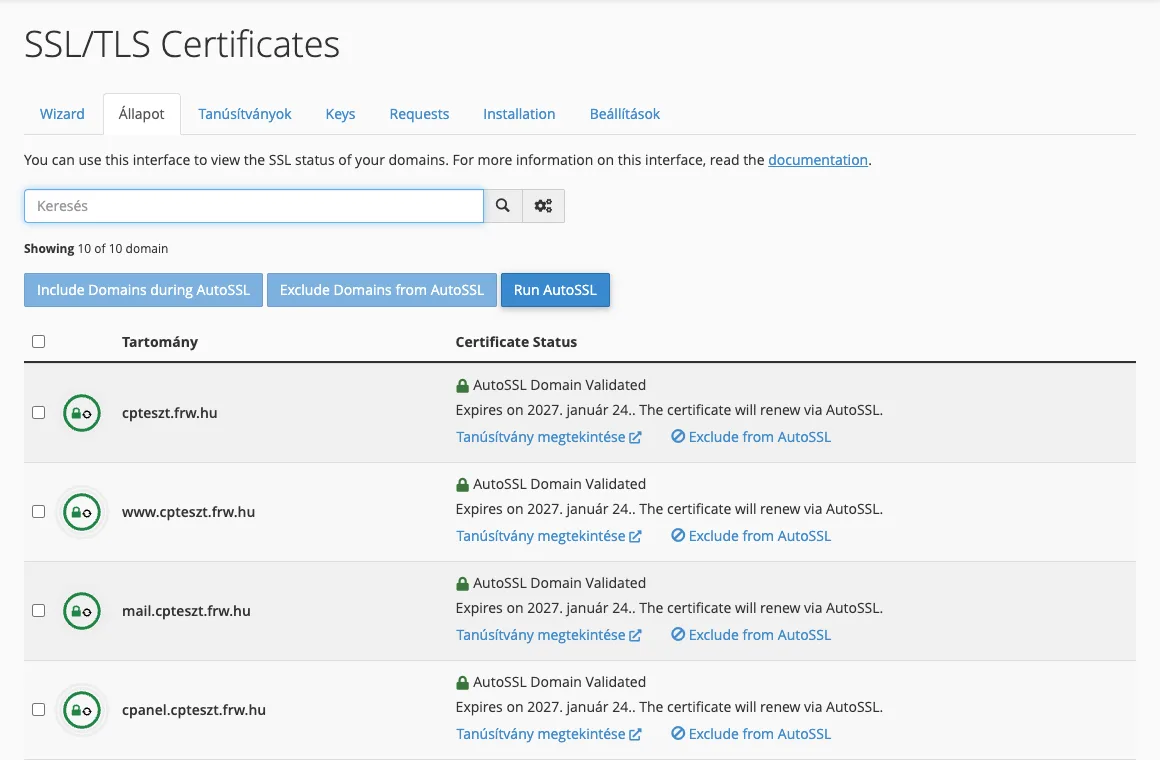
- The list shows, next to each domain, whether it has a valid certificate. For domains marked in yellow or red, the error message explains what prevented the certificate from being issued.
- Once the fix has been applied, you can restart the process immediately by clicking the ‘Run AutoSSL’ button; you do not need to wait for the next automatic run.
The most common causes
The domain does not point to our server
This is the most common reason. If the domain’s A record (or its name servers) still points to the previous provider, the certificate authority will look for the verification file there and will not find it. After a domain migration or a change of name servers, please wait until the change takes effect (see: What is DNS propagation?), then run AutoSSL again.
Please also check that the domain does not have an IPv6 (AAAA) record pointing elsewhere. The certificate authority may also use the IPv6 address, and if our server does not respond to it, the verification will fail.
The www record is missing
AutoSSL also requests a certificate for the www.pelda.hu address. If there is no www record in the DNS, or if it points elsewhere, the www version will be omitted from the certificate. Set up a CNAME record for the www subdomain pointing to the main domain, or an A record pointing to the hosting IP address.
.htaccess blocks or redirects access
If a rule in the .htaccess file redirects all requests (for example, to another domain, a maintenance page or behind password protection), the control file will also be inaccessible. Add an exception for the .well-known directory before the redirect rules:
RewriteEngine On
RewriteRule ^\.well-known/ - [L]
A security extension or a country filter that blocks the certificate authority’s servers may also cause a similar problem.
Is there a Cloudflare or other proxy in front of the domain?
The Cloudflare proxy does not usually prevent verification, but if ‘I’m Under Attack’ mode, strict firewall rules, country filtering or a redirect affecting the /.well-known/ path is configured in Cloudflare, the certificate authority’s request will not reach the hosting provider. The article ‘AutoSSL Behind Cloudflare’ describes how to identify and permanently resolve this issue; the article ‘SSL Behind Cloudflare: Flexible, Full or Full (strict) mode?’ discusses Cloudflare’s SSL modes.
CAA record prevents the release
The CAA record specifies which certificate authorities are permitted to issue certificates for the domain. If such a record exists but Let’s Encrypt is not listed in it, the certificate issuance will be rejected. See: What is a CAA record?
The domain is excluded from AutoSSL
On the Status tab, individual domains can be excluded from AutoSSL. If the ‘Include during AutoSSL’ link appears in a domain’s row (instead of ‘Exclude from AutoSSL’), the domain is excluded: click on the ‘Include during AutoSSL’ link (if there are multiple domains, select them and use the ‘Include Domains during AutoSSL’ button), then click the ‘Run AutoSSL’ button.
You have reached your spending limit
Let’s Encrypt limits the number of certificates that can be issued for a domain within a week, and the number of failed verifications permitted per hour. If verification has failed several times in a row, please wait a few hours, rectify the error, and only then restart AutoSSL.
Are you not using our name servers?
If you manage your domain’s DNS elsewhere (for example, with Cloudflare or your domain registrar), AutoSSL will still work as long as the A record (and the www record) points to your hosting IP address. You can find your hosting IP address on the cPanel homepage, in the General Information panel.
If you still do not receive a certificate for your domain after following the steps above, please contact our support team and send them the error message displayed on the ‘Status’ tab of the SSL/TLS Certificates page.